Author name: Yogendra@

✍️ Content Marketing

Content Marketing: How to Turn Helpful Content Into Real Customers?

Content Marketing: How to Turn Helpful Content Into Real Customers Plenty of businesses publish blogs, guides, social posts, and videos every month, and still struggle to connect any of it to actual sales. Traffic goes up. Enquiries don’t. This is where a lot of businesses quietly get stuck — they’ve figured out how to get people to consume content, but not how to create content that actually moves people toward a buying decision. Those are two different skills. Getting attention is the easy part. The real question is what happens after someone reads your article — do they leave and forget you, or do they walk away trusting you a little more than before? This article looks at how content marketing actually works: how helpful content attracts the right audience, answers their real questions, builds trust, removes hesitation, and gradually guides someone toward becoming a customer. Quick Answer: Content marketing turns visitors into customers by attracting the right audience, genuinely solving their problems, building trust through useful information, introducing relevant products or services once that trust exists, offering a clear next step, and nurturing interested visitors until they’re ready to buy. Click here What Is Content Marketing? Content marketing means creating genuinely useful content — articles, guides, videos, or other formats — built around what your potential customers actually want to know, rather than content built purely to promote your business. The simple idea is this: help first, sell later. It differs from traditional advertising in an important way. An ad interrupts someone to make a pitch. Content marketing earns attention by being genuinely useful, then lets trust do the persuading. A landscaping company writing “when to prune your hedges before winter” isn’t selling anything in that moment — it’s demonstrating expertise to someone who might need landscaping help eventually. Why Helpful Content Matters Most people research before they contact or buy from a business — reading reviews, comparing options, and looking for someone who clearly understands their problem. Content is often the first real interaction someone has with your business, long before any sales conversation happens. Genuinely useful content builds trust and demonstrates expertise, supports brand awareness, helps search visibility, educates the customer before they ever talk to you, solves real problems, and encourages better engagement than purely promotional material. All of that quietly builds the confidence someone needs before they’re willing to buy. How Content Supports the Customer Journey Awareness: The customer realizes they have a problem. This is where blog posts, educational videos, social content, beginner guides, and infographics tend to work well — broad, accessible content that meets someone at the very start of their search. Consideration: The customer starts researching solutions. Detailed guides, comparisons, case studies, checklists, webinars, and expert articles help here, since the reader is now actively weighing options. Decision: The customer is close to choosing. Service pages, product comparisons, testimonials, case studies, FAQs, demonstrations, and clear pricing information matter most at this stage. Conversion: The customer is ready to act. This is where contact forms, consultation requests, free trials, purchase options, calls, demo requests, and newsletter signups give them an obvious next step. How content supports each stage of the customer journey How to Turn Helpful Content Into Real Customers 1. Create content around real customer problems. Start from the actual questions and frustrations your customers have, not topics that sound good in a content calendar. 2. Match content with search intent. Informational searches (“how to”) call for educational content, commercial searches (“best,” “compare”) call for comparisons, and transactional searches (“buy,” “book”) call for content closer to a decision. 3. Give genuine answers before selling. This is where many businesses go wrong — rushing to promote before actually answering the question the reader came with. 4. Build trust through expertise. Real experience, original insights, concrete examples, relevant data, and honest case studies do more for credibility than generic advice anyone could have written. 5. Add relevant calls to action. A natural next step — not a hard pitch — guides interested readers toward learning more. 6. Connect blog content with service pages. Internal links let genuinely interested readers discover the relevant service without having to go searching for it themselves. 7. Use lead magnets where appropriate. A free checklist, guide, template, or consultation can capture interest — but only if it’s genuinely useful, not a thin excuse to collect an email address. 8. Create content for different buying stages. One blog post can’t serve everyone from first-time researchers to ready-to-buy customers — plan content across the journey, not just at the top of it. 9. Use social proof. Testimonials, reviews, case studies, and real client results reduce the hesitation that keeps people from taking the next step. 10. Make the next step easy. A visitor shouldn’t have to hunt through your website to figure out what to do after reading — that friction quietly loses people who were otherwise interested. Content Types That Can Generate Customers Blog posts and how-to guides tend to work well for awareness and early education. Case studies and comparison articles support consideration, when someone is actively weighing their options. FAQs, videos, and service or product guides help at the decision stage, answering the specific hesitations someone has left. Social media content and email newsletters help distribute and reinforce your content across a wider audience, while checklists and ebooks work well as lead magnets that capture genuine interest. No single format needs to carry the whole journey — different pieces do different jobs. The Content Marketing Funnel A simple way to see the whole process: Helpful Content → Website Visit → Trust → Engagement → Lead → Follow-Up → Customer. Someone finds a genuinely helpful piece of content, visits your website, and starts building trust as they read. If the content is useful enough, they engage further — reading another article, browsing a service page. At some point, a relevant offer or CTA turns that interest into a lead. From there, genuine follow-up (not just automated emails)

📢 Google Ads & Paid Marketing

Google Ads for Beginners: A Simple Guide to Getting Started

Google Ads for Beginners: A Simple Guide to Getting Started Open a Google Ads account for the first time and it can feel like stepping into a cockpit — campaign types, bidding strategies, match types, conversion goals, all asking for a decision before you’ve even written your first ad. It’s no surprise a lot of beginners either freeze or just click through the defaults and hope for the best. The good news is that the core idea behind Google Ads is actually simple, even if the interface isn’t. This guide walks through it step by step — what Google Ads is, how it works, and how to set up a first campaign without getting lost in features you don’t need yet. Quick Answer: Google Ads is Google’s advertising platform that lets businesses promote products and services across eligible Google properties and partner placements. Businesses choose a goal, target relevant keywords or audiences, set a budget, and generally pay when someone interacts with their ad — with exact targeting options and formats depending on the campaign type chosen. Click here What Is Google Ads? Google Ads is paid advertising — businesses pay to appear in front of people, rather than earning that visibility for free the way organic search results do. Ads can appear on Google’s search results, and depending on the campaign type, across other Google properties and partner placements as well. The core difference is simple: organic search visibility is earned through SEO and isn’t paid for directly, while paid search visibility is bought, typically with advertisers paying when someone interacts with their ad in a qualifying way. A bakery might show up organically for “best sourdough recipe” after months of content work, while a Google Ads campaign for “bakery near me” could start showing an ad the same day it’s launched. How Does Google Ads Work? At a basic level, the process looks like this: a business creates a campaign, chooses a goal, selects relevant targeting, creates ads, and sets a budget and bidding approach. When someone’s search or browsing matches an opportunity, Google evaluates eligible ads and may show one to that person. If they click or take another desired action, the business measures the result and adjusts the campaign accordingly. Behind this sits something often called the ad auction — but it’s not simply a matter of the highest bidder automatically winning every time. Relevance, ad quality, your bid, and the context of the search all play a role in which ads actually get shown and how they perform. Why Do Businesses Use Google Ads? Google Ads lets businesses reach people who are actively searching, often faster than waiting for organic rankings to build. It offers real control over targeting specific audiences or locations, setting and adjusting a budget, and measuring exactly what’s happening with the campaign. It’s useful for generating leads, driving sales, promoting specific products or services, and quickly testing different offers and messaging. It’s not automatically the right fit for every business, though — it tends to work best when there’s genuine search demand for what you offer and a website ready to convert the traffic it sends. Google Ads vs SEO: What’s the Difference? Factor Google Ads SEO Traffic Paid Organic Speed Can provide visibility quickly Usually takes longer Cost model Advertising spend Investment in SEO work Control More direct control over campaigns Less direct control over rankings Long-term value Depends on ongoing campaigns Can build lasting organic visibility Best for Paid visibility, targeted campaigns Long-term organic growth Both can be genuinely useful, and neither is automatically better for every business — many businesses end up using both for different reasons. What You Need Before Starting Google Ads Before opening an account, it helps to have a clear business goal, a defined target audience, a website or relevant destination page ready to receive traffic, a clear product or service to promote, a realistic budget, defined conversion goals, and at least a basic sense of what your customers are actually searching for. Sending paid traffic to an unprepared website — slow, unclear, or missing a way to contact you — tends to waste budget regardless of how well the campaign itself is built. Step 1: Create Your Google Ads Account Setting up an account generally involves signing up with a Google account, providing basic business information, and working through Google’s setup flow. The exact interface and steps can change over time, so it’s worth checking Google’s current official setup guide rather than relying on older instructions. Whatever the current flow looks like, take time to review the account settings carefully — location, language, and billing details in particular — before launching your first campaign. Step 2: Choose the Right Campaign Goal Google Ads asks you to pick a goal early on — common options include leads, sales, website traffic, and awareness or reach, with app-related goals available for relevant businesses. The right goal depends on your business: a local service business often cares most about leads, an ecommerce store typically focuses on sales, and a newer brand might genuinely benefit from an awareness-focused goal depending on its specific objective. No single goal is universally correct — pick the one that actually matches what you’re trying to achieve. Step 3: Choose a Google Ads Campaign Type Common campaign types include Search, Display, Shopping, Video, App, and Performance Max, each generally designed for a different purpose — Search ads target people actively typing queries, Display ads show visual ads across a network of sites, Shopping ads showcase products, Video ads run on video platforms, and so on. For beginners, Search campaigns are often easier to understand at first, since they’re built around capturing existing search demand from people already looking for something specific. That doesn’t mean Search is always the best choice — an ecommerce store might get more value from Shopping ads, for instance. Campaign types and their features can change, so check Google’s current documentation before deciding. Step 4: Choose the Right

📢 Google Ads & Paid Marketing

How Much Should a Small Business Spend on Google Ads?

How Much Should a Small Business Spend on Google Ads? “How much should I actually put toward Google Ads?” is one of the most common questions small business owners ask, and it’s also one of the hardest to answer honestly. Most people want a single number. The truth is there isn’t one — a dentist in a competitive city and a niche consultant with almost no direct competitors could reasonably spend very different amounts and both be making the right call. What actually determines a sensible budget is your industry, your competition, your keyword costs, how well your website converts, and what a new customer is actually worth to you. This article walks through how to think through those pieces so you can land on a starting budget that makes sense for your specific business, not someone else’s. Quick Answer: There’s no single correct Google Ads budget for every small business — it depends on your industry, location, keyword costs, competition, conversion rate, and what a customer is worth to you. Many businesses start with a modest, controlled test budget to gather real data, then adjust based on results. A specific number without knowing your numbers would just be a guess. Click here Is There a Minimum Budget for Google Ads? Google Ads doesn’t require a large minimum spend to get a campaign running, but a technically possible tiny budget isn’t necessarily a practically useful one. If your daily budget is too small to generate more than a handful of clicks, you won’t gather enough data to actually tell whether your targeting, ads, or landing page are working. A more useful way to think about a minimum is in terms of data, not just dollars: your budget needs to be large enough to generate a reasonable number of clicks over a few weeks, so you have something real to evaluate. Platform-specific rules and minimums can change, so it’s worth checking Google’s own current documentation rather than relying on older figures. How Much Should You Spend on Google Ads Per Day? A simple way to plan: daily budget × days in the month ≈ approximate monthly spend. That said, actual daily spending can vary somewhat day to day depending on campaign delivery and demand, so treat your daily budget as planning guidance rather than a fixed daily cap you’ll hit exactly every single day. How Much Should You Spend on Google Ads Per Month? Thinking monthly gives you more useful planning flexibility than obsessing over the daily number. Consider your monthly budget in terms of purpose: a smaller testing budget to learn what works, an ongoing lead-generation budget once you know your numbers, extra allocation for seasonal campaigns if relevant, and a scaling budget you add once a campaign has proven itself with real conversion data. Example Google Ads Budgets for Small Businesses These are illustrative examples meant to show a general shape, not guaranteed recommendations for your specific business — actual appropriate amounts depend heavily on your industry and location. Budget Level General Idea Suitable For Small Test Enough for a limited but meaningful data sample Testing keywords and offers Starter A modest, sustained monthly commitment Local or service businesses Growth Scaled up based on proven performance Businesses with working campaigns Higher Scale Meaningfully larger, backed by strong data Businesses with reliable conversion history Actual dollar or rupee amounts vary too much by industry and market to list responsibly here — check current CPC data for your specific keywords through Google’s own tools before settling on a number. What Determines How Much You Need to Spend on Google Ads? Industry. Some industries simply have more advertisers competing for the same searches, which tends to push costs up. Keywords. Different keywords carry different levels of competition and commercial value — a broad, high-intent term usually costs more than a specific, long-tail one. Location. Costs and competition can vary noticeably between markets, even within the same country. Search volume. A larger addressable market with more search demand may require a larger budget just to capture a meaningful share of it. Competition. More advertisers bidding on valuable searches generally affects prices, similar to any auction. Conversion rate. A better-converting website turns the same traffic into more leads, effectively making your budget go further. Customer value. A business selling a high-value service can often justify a higher acquisition cost than a business with a low-ticket product. Campaign quality and relevance. Well-targeted campaigns with relevant ads and landing pages tend to get more out of the same spend than poorly matched ones. What Is CPC and Why Does It Matter? CPC stands for Cost Per Click — what you pay, on average, each time someone clicks your ad. CPC varies by keyword, industry, competition, and how relevant your ads and landing page are considered to be. Cheap clicks aren’t automatically good, and expensive clicks aren’t automatically bad — what matters is the value of the customer behind the click. As a simple fictional example: a $2 click for a low-margin product might be too expensive, while a $15 click for a service worth thousands of dollars in customer value could be a genuine bargain. How to Calculate a Google Ads Budget A simple planning framework: required clicks = desired conversions ÷ conversion rate, and then estimated ad spend = required clicks × average CPC. These are planning formulas to help you estimate, not guarantees of what will actually happen. As a purely illustrative fictional example: if a business wants 20 leads a month, expects a 5% conversion rate, that works out to roughly 400 clicks needed. At an example CPC of ₹50, that’s an estimated spend of around ₹20,000. These numbers are made up for illustration only — they are not a representation of actual average Google Ads costs for any real industry. How Much Should a Local Business Spend on Google Ads? Whether you’re a plumber, dentist, salon, restaurant, real estate agent, home service provider, local consultant, or digital marketing agency, the same

📢 Google Ads & Paid Marketing

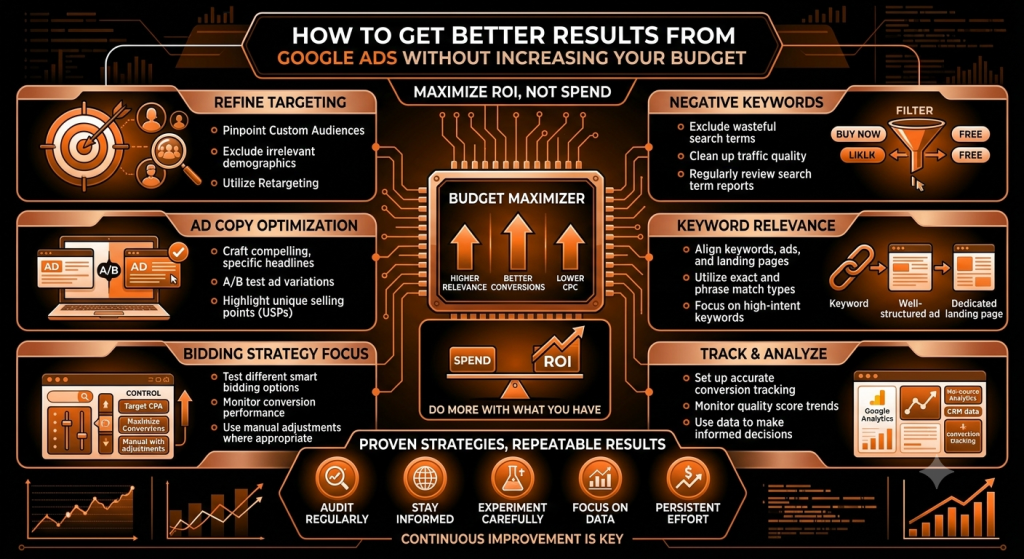
How to Get Better Results From Google Ads Without Increasing Your Budget ?

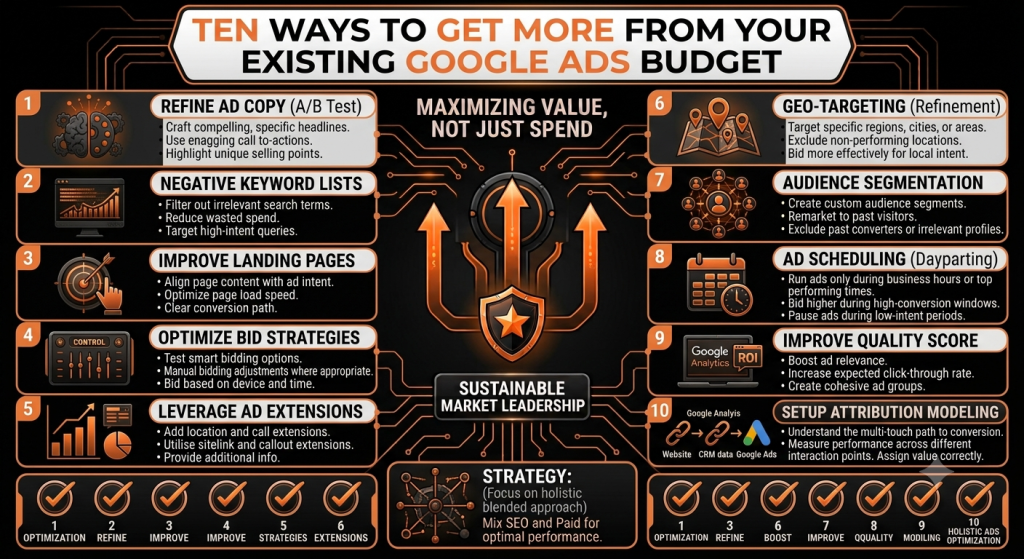
How to Get Better Results From Google Ads Without Increasing Your Budget When Google Ads results start slipping, the first instinct for a lot of businesses is to raise the budget and hope more spend fixes it. Sometimes that just means paying for more of the same wasted clicks. If your targeting, ad copy, or landing page aren’t working, a bigger budget mostly amplifies the problem rather than solving it. Before spending more, it’s worth checking whether you’re actually getting the most out of what you’re already spending. This article walks through ten practical ways to improve Google Ads performance using your existing budget — no dramatic overhaul required, just a closer look at where your money is actually going. Quick Answer: You can often get better Google Ads results without increasing your budget by removing wasted clicks, improving keyword targeting, adding negative keywords, improving ad relevance, strengthening your landing pages, tracking conversions correctly, and shifting budget toward the campaigns and search terms that are already performing well. Click here Better Google Ads Results Start With Better Optimization More budget and better use of your existing budget are two different problems. If a business is spending money on clicks that were never going to convert, increasing the budget doesn’t fix anything — it just increases the amount of wasted spend. A simple example: if 30% of your ad spend is going toward searches that have nothing to do with what you actually sell, doubling your budget doesn’t improve your results proportionally. It’s usually more effective to fix that leak first, then think about whether more budget makes sense. 1. Check Your Search Terms Regularly Search terms are the actual phrases people typed before your ad showed up — and they can differ quite a bit from the keywords you’re targeting, especially with broader match types. Reviewing this report regularly shows you exactly where your budget is going. A landscaping business targeting “lgarden design” might discover it’s also showing up for “garden design games” or “free garden design software” — clicks that were never going to become customers. Spotting patterns like this is one of the fastest ways to find wasted spend and real keyword opportunities you hadn’t considered. 2. Add Negative Keywords to Stop Wasted Clicks Negative keywords tell Google which searches you don’t want your ad to appear for. They’re one of the most direct ways to protect a limited budget from irrelevant clicks. A business selling premium leather bags might add “cheap,” “free,” or “DIY” as negative keywords, since those searchers are unlikely to be looking for what they’re offering. The right negative keywords depend entirely on your actual business and what you’ve seen show up in your search terms report — there’s no universal list that works for everyone. 3. Focus Your Budget on High-Intent Keywords Not every click carries the same value. Informational searches (“what is”, “how does”) usually indicate someone still researching, while commercial or buyer-focused searches (“book,” “hire,” “near me,” “price”) tend to signal someone closer to making a decision. A moving company might get plenty of clicks from “how to pack for a move” but far more conversions from “movers near me” or “moving company quote.” Choosing keywords based on what actually matches your business goals — not just search volume — tends to make a real difference in efficiency. 4. Write Ads That Match What People Are Searching For Ad relevance affects who actually clicks through. An ad that closely matches the search someone just typed tends to attract more qualified clicks than a generic, one-size-fits-all ad. For “emergency plumber [city],” an ad that says “24/7 Emergency Plumber — [City] — Call Now” is more directly relevant than a vague “Quality Plumbing Services.” Clear benefits, a specific offer, a strong call to action, and language that directly addresses the searcher’s problem all help — though no specific wording can guarantee a higher click-through rate on its own. 5. Improve Your Landing Page Before Spending More The path is simple: Ad → Landing Page → Conversion. If the landing page is slow, confusing, or doesn’t match what the ad promised, even perfectly targeted clicks won’t convert — and that’s wasted spend regardless of how well the ad itself performed. Focus on message match (the page should clearly continue what the ad said), a clear headline, a strong offer, easy navigation, a mobile-friendly layout, fast loading, an obvious call to action, visible trust signals, and a simple form that doesn’t ask for more than necessary. Fixing a weak landing page is often more impactful than any bidding adjustment. 6. Make Sure You Are Tracking the Right Conversions Conversion tracking tells Google’s systems and you what actually counts as a win — a lead, a call, a form submission, a purchase, a booking, or another meaningful business action. If you’re tracking the wrong thing, or nothing at all, both your reporting and Google’s automated bidding can end up optimizing toward the wrong outcome. A business tracking “page views” instead of “form submissions,” for example, might think a campaign is doing well when it’s actually generating very few real enquiries. Getting this right is foundational — every other optimization depends on accurate data. 7. Put More Attention on What Is Already Working Optimization isn’t only about cutting things that spend money — it’s also about noticing what is already generating good outcomes and giving it more attention. Review performance across campaigns, ad groups, keywords, search terms, locations, devices, audiences, individual ads, and landing pages. If one search term or ad group is quietly producing most of your genuine leads, that’s worth understanding and potentially building on — rather than treating your account as one uniform block that all needs the same adjustments. 8. Avoid Paying for Clicks From the Wrong Locations Location targeting matters a lot for local, service-area, and regional businesses. It’s worth checking whether your ads are actually reaching people in places you serve — broad or default targeting settings can sometimes show

📢 Google Ads & Paid Marketing

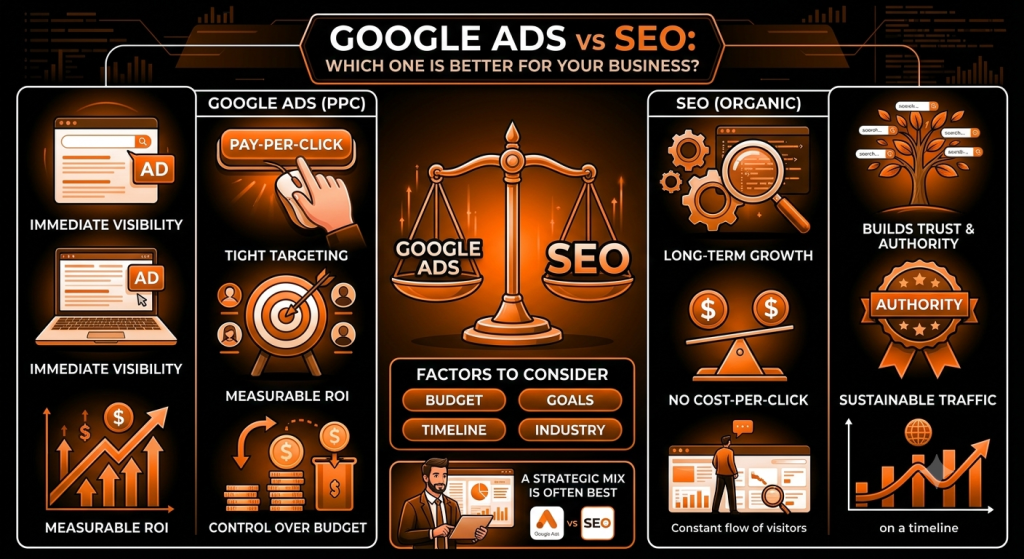
Google Ads vs SEO: Which One Is Better for Your Business ?

Google Ads vs SEO: Which One Is Better for Your Business? Most business owners run into this decision sooner or later: put money into Google Ads for quick visibility, or invest time into SEO for organic growth that builds over months. Both promise to bring in customers through search, and both cost something — just in different currencies, time versus budget. The confusion is understandable. Agencies pitch SEO as the long game and Google Ads as instant results, but neither story is complete on its own. This article breaks down what SEO and Google Ads actually do, how they compare on speed, cost, and long-term value, and how to figure out which one — or whether both — makes sense for your business. Quick Answer: Google Ads can provide faster visibility and traffic once a campaign is running, while SEO generally takes longer but can build sustainable organic visibility over time. Neither is automatically better for every business — the right choice depends on your goals, budget, competition, and how quickly you need results. In many cases, businesses benefit from using both. Click here What Is SEO? SEO, or search engine optimization, is the practice of improving a website so it shows up in organic (unpaid) search results. It covers on-page SEO — titles, headings, and content on your own pages — technical SEO, which covers things like site speed and crawlability, and off-page SEO, which mainly involves building credibility through other sites linking back to yours. Search engines discover pages by crawling links, decide whether to index them, and then rank indexed pages based on relevance, content quality, site authority, and user experience. A simple example: a plumbing company that publishes a genuinely useful guide on “how to stop a leaking tap” and structures its site well has a real shot at showing up when someone nearby searches that exact problem. What Are Google Ads? Google Ads is Google’s paid advertising platform. Businesses bid on keywords so their ads appear above or alongside organic results when someone searches a relevant term. Advertisers typically set a budget, target specific keywords or audiences, write ad copy, and send clicks to a landing page built around a conversion goal — a call, a form, or a purchase. Generally, businesses pay when someone interacts with the ad, such as clicking it, though exact billing details and available ad formats vary and can change over time — it’s worth checking Google’s own documentation for current specifics rather than relying on older information. A simple example: a local electrician might run a campaign targeting “emergency electrician [city]” so their ad appears right when someone urgently needs help, rather than waiting to rank organically for that term. Google Ads vs SEO: What’s the Difference? Factor SEO Google Ads Traffic type Organic Paid Speed Usually slower Usually faster Cost model Investment in SEO, content, and technical work Ongoing advertising spend Long-term value Can build lasting organic visibility Traffic generally depends on active campaigns Control Less direct control over rankings More control over targeting and budget Visibility Organic search results Paid placements Testing Slower to test some changes Faster campaign testing Best suited for Long-term growth Faster traffic and campaigns None of these rows are absolute rules — a competitive industry can make SEO slow regardless of effort, and a well-optimized ad campaign can sometimes sustain results for a long time. The table is a general pattern, not a guarantee. Which Gives Faster Results: SEO or Google Ads? Google Ads generally produces visibility faster — once a campaign is approved and running, your ad can start appearing right away. SEO normally takes more time because rankings depend on many factors: your website’s current authority, content quality, technical health, and how competitive your industry is. It’s worth being careful with the word “faster,” though. Faster traffic isn’t automatically better traffic — it only helps when your offer, landing page, targeting, and conversion process are strong enough to actually turn clicks into customers. Results also vary widely by website and industry, so there’s no guaranteed timeline for either approach. Google Ads vs SEO: Which One Costs More? Google Ads requires an ongoing advertising budget — you generally stop appearing once you stop paying. SEO involves a different kind of cost: strategy, content creation, technical improvements, and authority-building work, often supported by tools or outside expertise. It helps to be clear about two common misconceptions: SEO doesn’t mean “free traffic” — real work and often real money go into it — and Google Ads doesn’t automatically mean “expensive traffic,” since costs depend heavily on your industry and competition. A niche, low-competition service might see reasonable ad costs, while a crowded market can push costs up considerably. SEO and Google Ads, side by side Which Is Better for Long-Term Growth? SEO tends to offer stronger long-term value when a business consistently builds useful content, improves its website, and earns organic visibility over time — that visibility doesn’t disappear the moment you stop actively working on it, though it can decline without ongoing attention. Google Ads remains genuinely valuable for different situations: immediate campaigns, product launches, seasonal offers, promotions, lead generation pushes, testing new offers, and capturing high-intent searches right when they happen. It’s less about one being “better long term” and more about which job each one is suited for. SEO vs Google Ads: Which Has Better ROI? ROI can’t be settled by simply declaring a winner — it depends on cost per lead, cost per acquisition, conversion rate, customer lifetime value, average order value, profit margin, traffic quality, campaign costs, SEO investment, and how long it takes to see results. As a simple illustration: one business might spend steadily on Google Ads and see consistent, measurable leads from day one, while another invests the same amount into SEO over a year and ends up with lower ongoing costs per lead once rankings establish — but only after an initial period with little return. Neither outcome is universal; it depends entirely

🚀 SEO & AI Search

How to Build a Strong Online Presence for Your Business ?

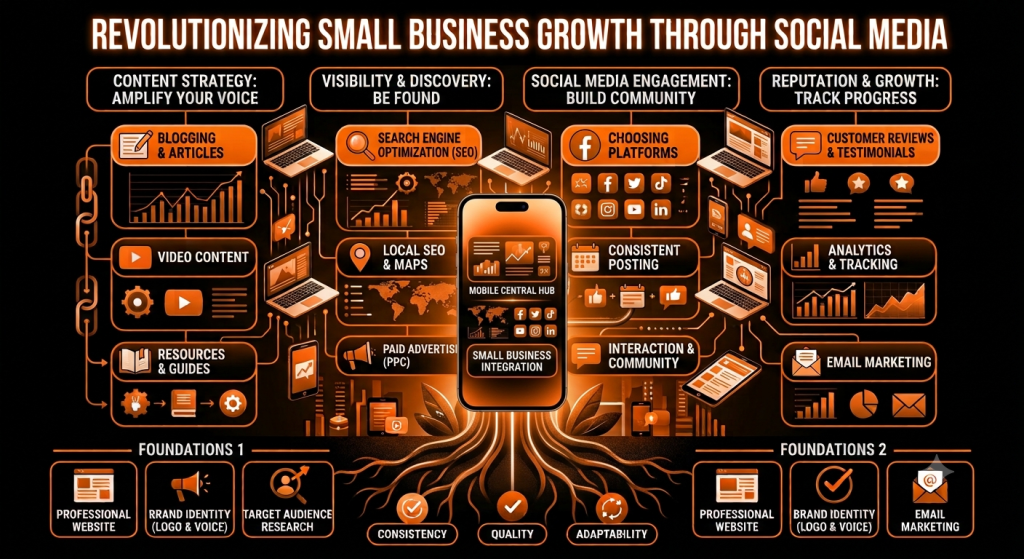
How to Build a Strong Online Presence for Your Business Someone hears about your business from a friend, a signboard, or a passing mention online. Before they call or walk in, they search your name. If what they find is an outdated website, no reviews, a dead social page, or nothing at all, they quietly move on to a competitor who looked more established — even if your actual product or service is better. This happens constantly, and it’s rarely about one big failure. It’s usually a collection of small gaps: a website that hasn’t been touched in years, a Google profile that’s half-filled, reviews that went unanswered. None of these alone sinks a business, but together they quietly cost you customers you never even knew you lost. A strong online presence fixes that. It’s not about being everywhere at once — it’s about being visible, credible, and easy to engage with wherever a potential customer happens to look. This guide walks through what that actually involves: your website, search visibility, local SEO, social media, content, reviews, branding, and how to tie it all together into something you can realistically maintain. Click here What Is an Online Presence? An online presence is the full picture of how your business shows up online — not just a website, but everything a potential customer might encounter while researching you. That includes your website, how you appear in search engines, your Google Business Profile, your social media accounts, listings on business directories, customer reviews, any content you publish, your email communication, and your overall online reputation. A strong online presence looks like this in practice: a customer searches your business name, finds an accurate Google profile with recent photos and reviews, clicks through to a website that loads quickly and clearly explains what you offer, and maybe notices an active, relevant social account along the way. Every touchpoint tells the same, consistent story. Why Is a Strong Online Presence Important for Your Business? A well-built online presence supports real business outcomes, even though being online by itself doesn’t automatically produce customers. It helps by: Making you easier to find when someone is actively looking Building trust before a customer ever speaks to you directly Reaching new customers beyond your existing network Increasing overall brand awareness in your market Generating leads through your website and profiles Supporting sales by answering questions before someone asks them Helping smaller businesses compete with larger, better-funded ones Improving how customers reach and communicate with you Building long-term brand credibility, not just short-term traffic The businesses that benefit most treat this as ongoing work connected to real goals, not a checklist to complete once and forget. 1. Create a Professional Business Website Your website is usually the foundation everything else points back to. It should have professional design, clear messaging, a genuine about page, a clear list of services or products, visible contact information, obvious calls to action, testimonials, and other trust signals. Easy navigation, fast loading, mobile responsiveness, and a secure HTTPS connection aren’t optional extras — they’re baseline expectations now. Within a few seconds of landing on your homepage, a visitor should understand what you do, who it’s for, and what to do next. 2. Optimize Your Website for Search Engines SEO is the practice of helping search engines understand and rank your pages while also giving visitors a genuinely good experience. That starts with keyword research grounded in real search intent, then carries through to title tags, meta descriptions, clear headings, genuinely helpful content, sensible internal linking, and optimized images. Technical SEO — page speed, mobile usability, and structured data where it’s appropriate — matters too, since none of your content helps if search engines can’t properly access or understand it. No one can honestly guarantee a specific ranking; what consistent SEO work does is steadily improve your odds of being found. 3. Focus on Local SEO If your business serves a specific area, local SEO is often the fastest route to genuinely interested customers. It covers your Google Business Profile, local keywords, reviews, accurate business information, local citations, location pages, Google Maps visibility, and local content. Think about how people actually search: “digital marketing agency in Lucknow,” “best salon near me,” “plumber in [city],” “restaurant near me.” These are high-intent searches — the person is usually close to making a decision, not just browsing, which is exactly why local visibility matters so much. 4. Build a Strong Google Business Profile Your Google Business Profile is often the first real impression a potential customer forms of your business. Keep it accurate and complete: business name, category, address or service area, phone number, website, hours, photos, your list of services or products, and genuine reviews. Post updates where relevant. Avoid fake reviews, misleading information, or keyword-stuffed business names — these violate Google’s guidelines and put your whole profile at risk. And no profile optimization, however thorough, guarantees a specific ranking position. 5. Build a Consistent Social Media Presence Social media supports visibility and, more importantly, ongoing customer relationships. Choose platforms based on where your target audience actually spends time, your industry, the content formats you can realistically produce, and the resources you have — not every business needs to be on every platform. Facebook, Instagram, LinkedIn, YouTube, TikTok, and X each suit different audiences and goals. What matters more than platform count is consistent branding, genuinely useful posts, real engagement, responding to customers, and a mix of visual and video content that reflects how you actually operate. 6. Create Helpful and Relevant Content Content marketing means creating material that answers the real questions, problems, and needs your customers have — blog posts, guides, tutorials, case studies, FAQs, videos, infographics, checklists, and social posts. A repair business might publish a maintenance checklist; a consultancy might publish a short case study; a salon might answer the questions customers ask most during a consultation. The pattern that works is starting from a real customer question, not a keyword list.

Scroll to Top