
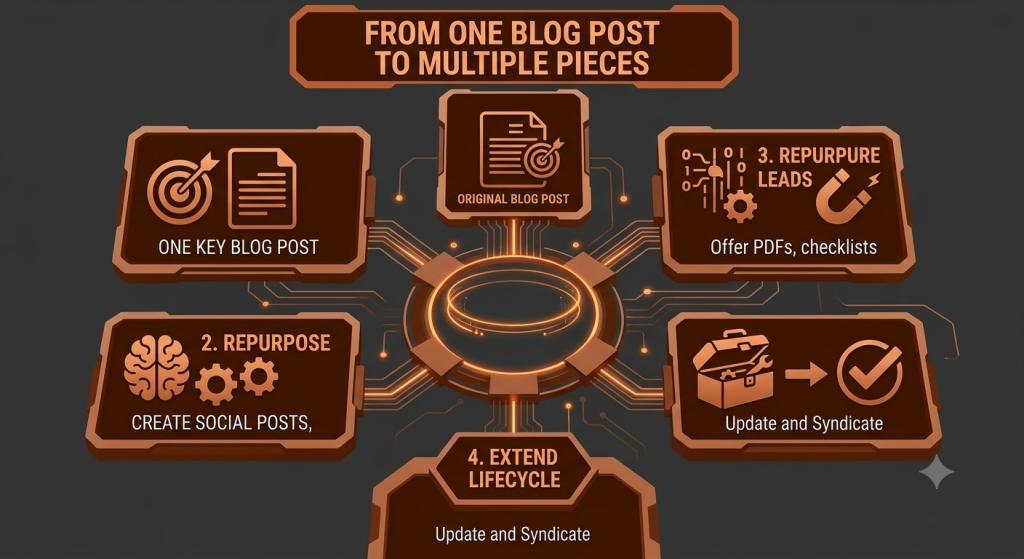
How to Turn One Blog Post Into Multiple Pieces of Content
Most content teams spend hours researching, writing, and editing a single blog post — and then the moment it’s published, they move straight on to the next topic. The post sits there quietly doing its job, while all that research and thinking behind it never gets used again.
Here’s the thing: one good blog post usually has more value in it than a single publish date gives it credit for. Buried inside that one article are enough ideas for social posts, a short video or two, an email, maybe even a carousel. You don’t always need a fresh idea to fill next week’s content calendar. Sometimes you just need a better way to use what you already wrote.
That’s really what content repurposing is about — not copying and pasting the same paragraph into five different apps, but pulling the useful pieces out of one article and reshaping them for the places your audience actually spends time.
Quick Answer: How Can One Blog Post Become Multiple Pieces of Content?
A blog post can be repurposed by pulling out its key ideas, tips, examples, and questions, then reshaping each one for a different format — a social post, a short video, an email, a carousel, an infographic, or an FAQ. The core idea stays the same; only the length, tone, and presentation change to fit each platform.
What Is Content Repurposing?
Content repurposing means taking something you’ve already created and adapting it into a different format, instead of writing everything from scratch every single time. It’s not the same as simply reposting the same text on another platform — that usually falls flat because every platform has its own rhythm.
A blog post is written to be read slowly, with headings and paragraphs. A LinkedIn post is read in seconds, often on a phone, competing with a dozen other things in someone’s feed. If you post the exact blog paragraph as a LinkedIn update, it usually looks out of place and gets scrolled past.
Say you wrote a detailed post on email marketing mistakes. Repurposing it doesn’t mean pasting the whole thing into an email. It means picking one mistake, rewriting it in two or three punchy lines, and turning it into its own post — something that makes sense even if nobody has read the original article.
Why Should You Repurpose Your Blog Content?
1. Save Time
You’ve already done the research and worked out your main points. Reusing that thinking is a lot faster than starting from a blank page for every new piece of content.
2. Reach More People
Not everyone reads blogs. Some people prefer short videos, others scroll Instagram, others only open emails. Repurposing puts the same core idea in front of people wherever they actually are.
3. Stay Consistent
Publishing consistently gets a lot easier once you’re not trying to invent a brand-new topic every single time. One blog post can quietly fuel a week or two of smaller content.
4. Get More Value From Existing Work
A well-researched article shouldn’t be used once and forgotten. Repurposing stretches the value of the time you already put into writing it.
5. Reach Different Platforms
Blog readers, social scrollers, email subscribers, and video viewers all behave differently. Adapting the format to match each group usually works better than expecting everyone to come to your blog.
6. Reinforce Important Ideas
Seeing the same useful idea in a few different places — a post, a video, an email — can help it actually stick with people, instead of being forgotten the moment they close the tab.
7. Support SEO and Distribution
Repurposed content can link back to the original post and to related pages on your site, helping tie your content together and giving people more paths back to your website.
How Many Pieces of Content Can You Create From One Blog Post?
There’s no fixed number here — it really depends on how detailed the post is. But as a rough guide, one solid, well-structured article can often provide the raw material for:
- 5–10 social media posts
- 1–3 short-form videos
- 1 LinkedIn post
- 1 email newsletter
- 1 infographic
- 1 carousel
- 5–10 FAQ entries
- 1 checklist
- 1 longer video script
- A few quote-style or insight posts
These are examples to give you a sense of scale, not a guarantee. A short, narrow post might only give you two or three good ideas, and that’s fine — better to repurpose a handful of things well than force ten weak ones out of it.
How to Turn One Blog Post Into Multiple Pieces of Content
Step 1: Choose a Strong Blog Post
Not every article is worth repurposing. Look for posts with genuinely useful information, a few distinct subtopics, practical tips, real examples, or a step-by-step process. Evergreen posts — the kind that stay relevant for months or years — are usually the best candidates.
Step 2: Identify the Main Ideas
Go back through the post and pull out the core pieces: the main argument, the key lessons, any strong tips, examples you used, questions you answered, and any step-by-step process you walked through.
Step 3: Group Related Ideas
Some of these ideas will naturally cluster together. A section on common mistakes might become one theme; a section on tools might become another. Grouping them makes it easier to plan several pieces of content instead of one big pile of notes.
Step 4: Match Ideas With Formats
A quick tip works well as a short social post. A process with clear steps often works better as a carousel or short video. A tricky concept that needs explaining might be better suited to email, where you have more room to explain.
Step 5: Adapt for Each Platform
This is the step people skip, and it’s the one that matters most. Don’t copy blog paragraphs word-for-word. Change the length, the tone, the opening line, and the call to action so it fits where it’s being published.
Step 6: Create and Schedule
Once you know what you’re making, spread it out on a simple calendar instead of publishing everything the same week. A steady drip usually works better than one big burst followed by silence.
Step 7: Track What Performs
Keep half an eye on which repurposed pieces actually get engagement, clicks, or replies. That tells you which formats and topics are worth repeating next time — instead of guessing.
How to Turn a Blog Post Into Social Media Content
One blog post can usually fuel several different types of social posts, not just one recycled summary. A few reliable angles:
Tip Post
Pull one genuinely useful tip from the article and explain it in a few short lines, on its own.
Problem/Solution Post
Take a common problem your article addressed and frame the post around that problem, then offer the solution.
Mistake Post
If your article covered common mistakes, one mistake alone is often enough for a standalone post — “here’s a mistake we still see all the time.”
Checklist Post
Turn a list from the article into a simple, scannable checklist people can screenshot or save.
Question Post
Turn a section into a question that invites people to share their own experience or opinion in the comments.
Quote or Insight Post
If there’s a strong, original line or opinion in the article, it can stand alone as its own post.
Myth vs Fact Post
Only use this format when the topic genuinely has a common misconception worth correcting — forcing it where it doesn’t fit tends to feel gimmicky.
Whatever the format, the post should make sense to someone who has never read the original blog. If it only works as a teaser, it isn’t really repurposed content yet.
How to Turn a Blog Post Into a Carousel
Carousels work well because they mirror how a blog is structured — a beginning, a middle, and an end — just spread across slides instead of paragraphs. A simple structure:
| Slide | Content |
|---|---|
| Slide 1 | Hook — the problem or question |
| Slide 2 | Why this problem matters |
| Slide 3 | Key point 1 |
| Slide 4 | Key point 2 |
| Slide 5 | Key point 3 |
| Slide 6 | Practical takeaway |
| Slide 7 | Call to action |
A carousel isn’t the place to squeeze in the whole article. Pick three or four of the strongest points and let each slide breathe.
How to Turn a Blog Post Into Short Videos
Instead of trying to compress an entire article into one video, treat each idea inside it as a potential video of its own:
- One tip → one video
- One mistake → one video
- One question → one video
- One process → one video
- One example → one video
A simple structure that works for most short videos: Hook → Problem → Useful Insight → Example → CTA. Keep it tight — one clear idea per video is usually more watchable than trying to cover everything at once.
How to Turn a Blog Post Into a Video Script
For a longer video, the blog post can act as your outline rather than your script. A structure that tends to work:
- Hook
- Introduction
- The main problem
- Key points
- Examples
- Practical takeaway
- Call to action
Just remember a script needs to sound like speech, not like text read aloud. Read it out loud while you’re writing it — if it feels stiff to say, it’ll sound stiff on camera too.
How to Turn a Blog Post Into Email Content
A blog post can fuel more than one type of email — a newsletter roundup, a single educational email focused on one idea, a quick tip, or a short follow-up. A simple structure to work from:
Subject line → Hook → Useful insight → Short explanation → Link or CTA
The email itself should offer something useful on its own. “Read our new blog post” isn’t much of a reason to click — give the reader one real insight in the email itself, then link out for the rest.
How to Turn a Blog Into an Infographic
Infographics work best for information that’s naturally visual — steps, comparisons, statistics, or a simple before-and-after. Good candidates from a blog post include a process broken into stages, a checklist, or a short framework.
The goal is to simplify, not to cram the entire article onto one image. If someone needs to zoom in and read for two minutes, it’s not really working as an infographic anymore.
How to Turn a Blog Post Into FAQ Content
Most articles answer a few implied questions along the way, even if they were never written as a Q&A. Pulling those out and reformatting them as direct questions and short answers works well for website FAQ pages, social media answers, and customer support resources — and it tends to be genuinely useful for people scanning quickly rather than reading top to bottom.
How to Turn a Blog Into a Checklist
If your article includes a process or a list of steps, that’s usually checklist material. For example, a post on “how to prepare your website for a redesign” could easily become a short, downloadable checklist — useful as a website resource, a lead magnet, a social post, or even an internal document your own team can follow.
How to Turn One Blog Into a Full Content Series
A genuinely detailed article often has enough material inside it to become several related posts on their own. Say your main article covers content marketing strategy broadly. That could branch into:
- What is content marketing?
- Common content strategy mistakes
- How to build a content calendar
- How to promote content once it’s published
- How to measure content performance
- How to repurpose content (this article)
Instead of one post standing alone, you end up with a small, connected cluster of content that supports and links to itself.
Why You Should Not Post the Same Content Everywhere
Every platform has its own audience behaviour, expected length, tone, and pace. What reads as thorough on a blog can feel like too much on Instagram. What works as a quick LinkedIn post can feel thin as a standalone email. None of that means the underlying idea has to change — just how it’s presented.
Keep the core message the same across formats, and let the wrapping change to match where it’s being seen.
A Simple Content Repurposing Example
Here’s a fictional walkthrough to make this concrete. Imagine a blog post titled “How to Improve Your Website’s Google Visibility.” This example is illustrative only — no real numbers or results are implied.
- 1 blog post covering practical steps to improve search visibility
- 5 social posts — one tip each, pulled from different sections of the article
- 2 short videos — one on a common SEO mistake, one on a quick fix anyone can try
- 1 carousel walking through the main steps slide by slide
- 1 email sharing the single most useful insight from the post, with a link to read more
- 1 infographic visualising the step-by-step process
- 5 FAQs pulled from questions the article naturally answered
- 1 checklist summarising the steps into a simple, actionable list
Every one of these came from the same article, but none of them is a copy-paste of it.
A Simple Content Repurposing Workflow
Create → Extract → Adapt → Distribute → Measure → Improve
- Create — write one genuinely useful, detailed piece of content
- Extract — pull out the ideas, tips, and examples worth reusing
- Adapt — reshape each one for the format and platform it’s headed to
- Distribute — publish and share it where your audience actually is
- Measure — see what actually got attention or engagement
- Improve — use what you learned for the next round
How Content Repurposing Supports SEO
Repurposing itself isn’t a direct ranking factor, and posting the same content across social platforms doesn’t automatically improve your search rankings. What it can do is support your SEO indirectly — repurposed pieces can link back to the original post, extend the life of content that’s still relevant, and help more people discover it, which in turn can bring more visits and engagement back to your site.
Common Content Repurposing Mistakes to Avoid
- Copying the same text everywhere — adapt the length and tone for each platform instead
- Ignoring platform differences — what works on LinkedIn rarely works the same way on Instagram
- Creating too much low-value content — a few strong pieces beat a dozen thin ones
- Losing the original context — make sure each piece still makes sense on its own
- Overusing automation — auto-posted content often reads exactly like what it is
- Publishing without a schedule — spread repurposed content out instead of dumping it all at once
- Repurposing outdated information — double-check facts and details are still accurate first
- Focusing only on quantity — more pieces isn’t the goal, more useful reach is
- Forgetting the audience — the platform’s audience, not just the blog’s, should shape the format
- Weak hooks and unclear CTAs — the first line and the next step both need to earn attention
Which Parts of a Blog Post Should You Repurpose?
Not every paragraph deserves its own piece of content. Focus on the parts that carry the most weight on their own:
- The most genuinely useful sections
- Questions the article answers
- Strong, specific tips
- Practical, step-by-step advice
- Any surprising or counter-intuitive insight
- Common mistakes you covered
- Real examples or scenarios
- Any checklist or framework
If a section is mostly transition or context-setting, it usually isn’t worth repurposing on its own — save your effort for the parts that actually stand alone.
How Often Should You Repurpose Content?
There’s no universal schedule that works for every business. How often you repurpose depends on your audience, which platforms you’re using, how detailed the original content is, and how much time your team realistically has. A useful post repurposed thoughtfully over a few weeks is usually worth more than the same post rushed out in every format on day one. Quality and relevance matter more than hitting a specific number.
A Simple Content Repurposing Strategy for Small Businesses
You don’t need a big content team to make this work. A realistic monthly approach could look like:
- 1 strong, detailed blog post
- 4–8 social media posts pulled from it
- 2 short videos
- 1 email to your list
- 1 carousel
- 3–5 FAQ entries
- 1 checklist
Adjust these numbers based on how much the topic actually gives you — some months you’ll get more out of a post, some months less, and that’s completely normal.
How to Measure Your Repurposed Content
Different formats need different metrics, so it helps to check performance by type rather than lumping everything together.
Blog
- Organic traffic
- Engagement
- Conversions
Social Media
- Reach
- Engagement
- Clicks
- Saves or shares where relevant
- Open rate
- Click rate
- Conversions
Video
- Views
- Watch time
- Engagement
- Clicks where measurable
Business Results
- Leads
- Signups
- Calls
- Sales or qualified inquiries
The real goal isn’t just producing more content. It’s getting more useful reach and better outcomes out of the work you’ve already done.
Frequently Asked Questions
What is content repurposing?
Content repurposing means taking one piece of content, like a blog post, and adapting its ideas into different formats — social posts, videos, emails, carousels, and more — instead of writing something completely new each time.
How can I turn one blog post into multiple pieces of content?
Pull out the main ideas, tips, examples, and questions from the post, then reshape each one for a different format and platform, adjusting length, tone, and the call to action to fit where it’s being published.
How many pieces of content can come from one blog post?
It varies by article, but a detailed post can often provide enough material for several social posts, a couple of short videos, an email, a carousel, and a handful of FAQs. These are rough examples, not fixed numbers.
Can I repurpose old blog posts?
Yes, as long as the information is still accurate and relevant. Older evergreen posts are often great repurposing candidates — just double-check details haven’t gone out of date first.
How do I repurpose blog content for social media?
Pick one tip, mistake, question, or insight from the post and turn it into a short, standalone post that makes sense without anyone needing to read the original article.
Can a blog post become a video?
Yes. A blog post can work as an outline for a longer video, or individual sections within it can each become their own short-form video.
How can I turn a blog post into an email?
Share the single most useful insight from the post directly in the email, add a short explanation, and link out to the full article for readers who want more detail.
Is content repurposing good for SEO?
It can support SEO indirectly, by linking back to your original content and helping more people discover it, but repurposing alone isn’t a direct ranking factor.
How often should I repurpose content?
There’s no fixed schedule — it depends on your audience, platforms, and how much time you have. Focus on quality and relevance rather than hitting a set number of posts.
Is content repurposing useful for small businesses?
Yes, especially for businesses with limited time. One well-written blog post a month can realistically fuel several weeks of smaller content across social media, email, and video.
Suggested Internal Links
- Anchor text: “content marketing strategy” → Related page: Content Marketing Strategy
- Anchor text: “SEO tips for small business” → Related page: SEO Services
- Anchor text: “social media content ideas” → Related page: Social Media Marketing
- Anchor text: “email marketing for businesses” → Related page: Email Marketing Services
- Anchor text: “building a content calendar” → Related page: Digital Marketing Strategy
- Anchor text: “website content that converts” → Related page: Website Development
Conclusion
You don’t always need a brand-new idea to keep your content calendar full. Often, the better move is going back to a blog post you’ve already written and getting more out of it — a few social posts here, a short video there, one solid email built around its best idea.
Repurposing works best when it’s treated as adapting, not copying. The core idea can travel across formats and platforms; the presentation just needs to change to fit where it’s landing.
If you’ve got a blog post sitting there that did well or covers something genuinely useful, that’s probably a good place to start — go back, pull out its strongest points, and see how many smaller pieces of content it can realistically give you before you sit down to write something new.