🚀 SEO & AI Search

🚀 SEO & AI Search

How to Build a Strong Online Presence for Your Business ?

How to Build a Strong Online Presence for Your Business Someone hears about your business from a friend, a signboard, or a passing mention online. Before they call or walk in, they search your name. If what they find is an outdated website, no reviews, a dead social page, or nothing at all, they quietly move on to a competitor who looked more established — even if your actual product or service is better. This happens constantly, and it’s rarely about one big failure. It’s usually a collection of small gaps: a website that hasn’t been touched in years, a Google profile that’s half-filled, reviews that went unanswered. None of these alone sinks a business, but together they quietly cost you customers you never even knew you lost. A strong online presence fixes that. It’s not about being everywhere at once — it’s about being visible, credible, and easy to engage with wherever a potential customer happens to look. This guide walks through what that actually involves: your website, search visibility, local SEO, social media, content, reviews, branding, and how to tie it all together into something you can realistically maintain. Click here What Is an Online Presence? An online presence is the full picture of how your business shows up online — not just a website, but everything a potential customer might encounter while researching you. That includes your website, how you appear in search engines, your Google Business Profile, your social media accounts, listings on business directories, customer reviews, any content you publish, your email communication, and your overall online reputation. A strong online presence looks like this in practice: a customer searches your business name, finds an accurate Google profile with recent photos and reviews, clicks through to a website that loads quickly and clearly explains what you offer, and maybe notices an active, relevant social account along the way. Every touchpoint tells the same, consistent story. Why Is a Strong Online Presence Important for Your Business? A well-built online presence supports real business outcomes, even though being online by itself doesn’t automatically produce customers. It helps by: Making you easier to find when someone is actively looking Building trust before a customer ever speaks to you directly Reaching new customers beyond your existing network Increasing overall brand awareness in your market Generating leads through your website and profiles Supporting sales by answering questions before someone asks them Helping smaller businesses compete with larger, better-funded ones Improving how customers reach and communicate with you Building long-term brand credibility, not just short-term traffic The businesses that benefit most treat this as ongoing work connected to real goals, not a checklist to complete once and forget. 1. Create a Professional Business Website Your website is usually the foundation everything else points back to. It should have professional design, clear messaging, a genuine about page, a clear list of services or products, visible contact information, obvious calls to action, testimonials, and other trust signals. Easy navigation, fast loading, mobile responsiveness, and a secure HTTPS connection aren’t optional extras — they’re baseline expectations now. Within a few seconds of landing on your homepage, a visitor should understand what you do, who it’s for, and what to do next. 2. Optimize Your Website for Search Engines SEO is the practice of helping search engines understand and rank your pages while also giving visitors a genuinely good experience. That starts with keyword research grounded in real search intent, then carries through to title tags, meta descriptions, clear headings, genuinely helpful content, sensible internal linking, and optimized images. Technical SEO — page speed, mobile usability, and structured data where it’s appropriate — matters too, since none of your content helps if search engines can’t properly access or understand it. No one can honestly guarantee a specific ranking; what consistent SEO work does is steadily improve your odds of being found. 3. Focus on Local SEO If your business serves a specific area, local SEO is often the fastest route to genuinely interested customers. It covers your Google Business Profile, local keywords, reviews, accurate business information, local citations, location pages, Google Maps visibility, and local content. Think about how people actually search: “digital marketing agency in Lucknow,” “best salon near me,” “plumber in [city],” “restaurant near me.” These are high-intent searches — the person is usually close to making a decision, not just browsing, which is exactly why local visibility matters so much. 4. Build a Strong Google Business Profile Your Google Business Profile is often the first real impression a potential customer forms of your business. Keep it accurate and complete: business name, category, address or service area, phone number, website, hours, photos, your list of services or products, and genuine reviews. Post updates where relevant. Avoid fake reviews, misleading information, or keyword-stuffed business names — these violate Google’s guidelines and put your whole profile at risk. And no profile optimization, however thorough, guarantees a specific ranking position. 5. Build a Consistent Social Media Presence Social media supports visibility and, more importantly, ongoing customer relationships. Choose platforms based on where your target audience actually spends time, your industry, the content formats you can realistically produce, and the resources you have — not every business needs to be on every platform. Facebook, Instagram, LinkedIn, YouTube, TikTok, and X each suit different audiences and goals. What matters more than platform count is consistent branding, genuinely useful posts, real engagement, responding to customers, and a mix of visual and video content that reflects how you actually operate. 6. Create Helpful and Relevant Content Content marketing means creating material that answers the real questions, problems, and needs your customers have — blog posts, guides, tutorials, case studies, FAQs, videos, infographics, checklists, and social posts. A repair business might publish a maintenance checklist; a consultancy might publish a short case study; a salon might answer the questions customers ask most during a consultation. The pattern that works is starting from a real customer question, not a keyword list.
🚀 SEO & AI Search

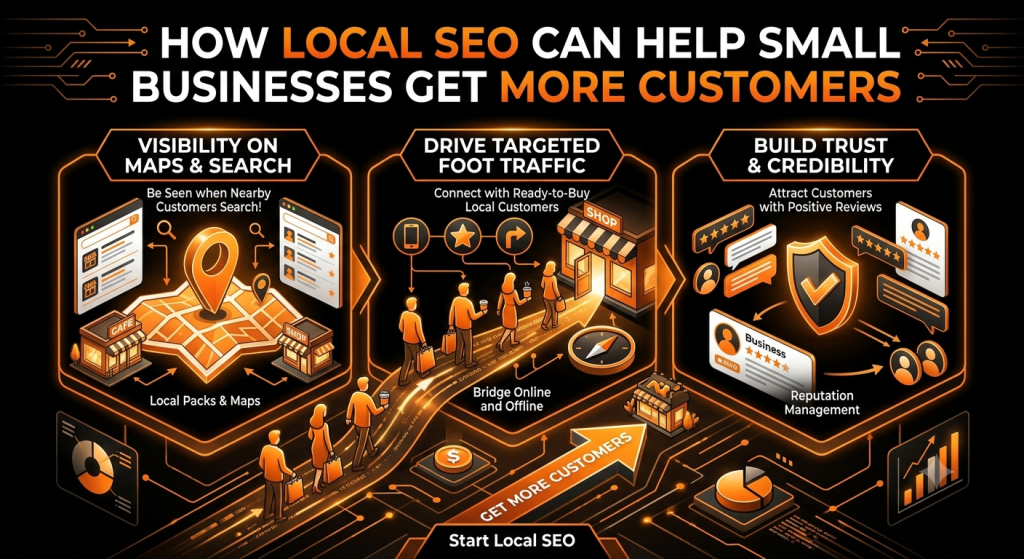
How Local SEO Can Help Small Businesses Get More Customers ?

How Local SEO Can Help Small Businesses Get More Customers Someone searches “plumber near me” or “best salon in Lucknow” on their phone. Google shows a handful of businesses with a map, star ratings, and a “Call now” button. If your business isn’t one of those results, that customer never finds you — they call whoever pops up first. This happens hundreds of times a day in every city, for every kind of business: clinics, salons, restaurants, repair shops, agencies, and home services. The businesses that show up get the calls, the walk-ins, and the bookings. The ones that don’t show up lose customers they never even knew they had a chance to win. That’s the entire idea behind Local SEO. It isn’t a technical trick or a one-time setup — it’s the ongoing work of making sure Google, and the people using it, can find your business, trust it, and choose it over the competition. In this guide, you’ll learn what Local SEO actually is, how it turns local searches into paying customers, and the practical steps you can start using this week — from your Google Business Profile to reviews, local keywords, citations, and mobile-friendly pages. What Is Local SEO? Local SEO is the practice of improving your business’s visibility in search results for people searching in or near your location. Instead of trying to rank for broad national terms, Local SEO focuses on searches tied to a place — a city, a neighborhood, or “near me.” Traditional SEO tries to get a website to rank for a topic, anywhere in the world. Local SEO tries to get a business to rank for that topic in a specific area, and to show up in Google’s local map results — often called the Local Pack — alongside the regular listings. A practical example: a bakery in Lucknow doesn’t need to rank for “cakes” across India. It needs to show up when someone nearby searches “cake shop near me” or “birthday cake delivery Lucknow.” That’s a Local SEO goal. Why Local SEO Matters for Small Businesses For a small business, visibility in local search isn’t a nice-to-have — it’s often the main way new customers discover you at all. A stronger local presence can lead to: More visibility in Google Maps and the Local Pack, right where buying decisions get made More website visits from people actively looking for what you sell More phone calls from ready-to-book customers More direction requests from people heading to your location More enquiries through your website or Google profile More walk-ins and store visits from nearby customers Increased trust, since a complete, well-reviewed profile signals a real, credible business Access to high-intent customers searching with the intent to buy, not just browse Unlike a billboard or a one-time ad, this visibility keeps working in the background every day, for every relevant search. How Local SEO Helps Small Businesses Get More Customers It helps to think of Local SEO as a journey, not a single action. A customer typically moves through several stages before becoming an actual customer: Local Search → Business Visibility → Website / Google Profile → Trust → Contact → Customer Local Search: Someone searches with local intent — “electrician near me” or “yoga classes in [city].” Business Visibility: Google decides which businesses are relevant enough to show, based on your profile, website, and reputation. Website / Google Profile: The searcher lands on your profile or website and forms a first impression. Trust: Reviews, photos, accurate information, and a professional-looking page build (or break) confidence. Contact: The customer calls, messages, requests directions, or fills out a form. Customer: The enquiry turns into an actual booking, sale, or visit. Local SEO touches every one of these stages. Skip one — say, your Google profile has no photos, or your reviews go unanswered — and customers drop out before they ever contact you. 1. Get Found When Customers Search Locally Location-based searches are some of the highest-intent searches on the internet. When someone types “dentist near me,” “digital marketing agency in Lucknow,” “best salon in [city],” “plumber near me,” or “restaurant near me,” they’re rarely just browsing — they usually want to book, call, or visit soon. That’s what makes these searches so valuable for small businesses. You’re not trying to convince someone they need a service; they’ve already decided. You just need to be one of the businesses they find, trust, and choose. 2. Optimize Your Google Business Profile Your Google Business Profile is often the first thing a potential customer sees about you — sometimes before they ever visit your website. It’s free to set up, and it directly affects whether you show up in the Local Pack and Google Maps. A well-optimized profile should include: Accurate business name, exactly as it appears on your signage and paperwork The correct business category and any relevant secondary categories A precise address or defined service area A working phone number and website link Accurate, up-to-date business hours Real photos of your location, team, and work A clear list of your services or products A concise, honest business description Regular posts for offers, updates, or events, where relevant Prompt responses to reviews and questions Avoid the temptation to stuff keywords into your business name or buy fake reviews to speed things up — both violate Google’s guidelines and can get your profile suspended, which does far more damage than a slow start. 3. Improve Your Google Maps Visibility Google Maps rankings are influenced by three main factors: Relevance: How well your profile matches what the person searched for Distance: How close your business is to the searcher or the area they searched Prominence: How well-known and reputable your business is, based on reviews, links, and overall online presence You can influence relevance and prominence by keeping your profile complete and building genuine reviews and local authority — but distance is outside your control for any individual search. No agency or strategy can guarantee a

🚀 SEO & AI Search

Why Your Website Is Not Ranking on Google and What You Can Do ?

Why Your Website Is Not Ranking on Google (And What to Do) SEO Reference (delete this section before publishing) SEO Title: Why Your Website Isn’t Ranking on Google (And What to Do) Meta Description: Not ranking on Google? Here are 15 common reasons, from thin content to slow speed, and a step-by-step action plan to improve your visibility. URL Slug: /why-website-not-ranking-on-google/ Primary Keyword: why your website is not ranking on Google Why Your Website Is Not Ranking on Google and What You Can Do Building a website and getting it to rank on Google are two very different achievements. You can have a clean design, a working contact form, and a product or service people genuinely want, and Google can still act like your site doesn’t exist. That gap between ‘the website is live’ and ‘the website shows up in search’ is where most business owners get stuck. There is rarely one single reason a website fails to rank. It’s usually a combination of smaller issues, maybe Google hasn’t indexed a few key pages, the content doesn’t quite match what searchers are actually looking for, the site loads a little too slowly, or there simply aren’t enough signals yet telling Google the site is trustworthy. None of these are dramatic on their own, but stacked together they’re enough to keep a site off page one. If you’re looking for the short answer: your website probably isn’t ranking because of some mix of indexing gaps, weak or mismatched content, unresolved technical issues, and a lack of authority relative to your competitors. The rest of this guide breaks each of those down, shows you how to check which ones apply to your site, and gives you a realistic plan to fix them. Why Is My Website Not Ranking on Google? Before going deep into each cause, here’s a quick map of the most common reasons websites don’t rank. You likely won’t be dealing with all of these at once, but most underperforming sites will recognize themselves in at least three or four. The website is new and hasn’t built up relevance or authority yet Important pages haven’t been crawled or indexed by Google The site is targeting the wrong keywords, either too competitive or not relevant enough Content doesn’t match what the searcher actually wants (search intent mismatch) Content is thin, generic, or doesn’t add anything beyond what already ranks Technical SEO issues are blocking crawlers or confusing Google about which pages matter The website is slow, especially on mobile The mobile experience is poor or hard to use Internal linking is weak, so Google can’t tell which pages are important There’s a limited backlink profile, so the site lacks external trust signals Competitors simply have stronger, more relevant, more authoritative pages Local SEO signals are missing or inconsistent for location-based searches There’s duplicate or overlapping content competing against itself Expectations are set for a timeline that doesn’t match how SEO actually works 15 Reasons Your Website Is Not Ranking on Google Here’s a closer look at each of these reasons, why it actually affects your rankings, and what you can realistically do about it. 1. Your Website Is New A brand-new website has no track record. Google hasn’t seen how often you publish, whether your content holds up over time, or how users respond to it. This isn’t a penalty, it’s simply that newer sites usually need time to accumulate the pages, links, and engagement signals that older, established sites already have. Aiapexa often sees this with businesses that expect page-one results within a few weeks of launch. The fix isn’t a shortcut, it’s consistency: publish useful pages regularly, keep the site technically clean from day one, and be patient while Google builds a picture of your site. 2. Google Has Not Indexed Your Pages Ranking is impossible if a page isn’t indexed, meaning Google hasn’t added it to its database of pages it can show in search results. Indexing comes after crawling: Googlebot visits a page, reads it, decides whether it’s worth storing, and then decides whether to show it for relevant queries. A page can be crawled and still not indexed if Google doesn’t see enough value in it yet. Open Google Search Console, check the Pages report under Indexing, and look at which URLs are marked ‘not indexed’ and why. Common reasons include a noindex tag left on by accident, a robots.txt block, or Google simply deciding the content isn’t distinct enough to include. 3. You Are Targeting the Wrong Keywords Choosing keywords is a balancing act between relevance, search volume, and competition. A common mistake is going straight for broad, high-volume terms that established competitors have owned for years, while ignoring more specific phrases that are easier to rank for and often convert better. A local bakery targeting just ‘cakes’ is competing with national brands and recipe sites; targeting ‘custom birthday cakes in [city]’ is realistic and far more relevant to actual customers. Use Search Console and a keyword research tool to find terms where you have a genuine shot, then build content around those first. 4. Your Content Does Not Match Search Intent Search intent is what the person actually wants when they type a query, and it’s one of the most overlooked ranking factors. Someone searching ‘what is SEO’ wants an explanation (informational intent). Someone searching ‘best SEO agency for small business’ wants comparisons (commercial intent). Someone searching ‘hire SEO agency near me’ is ready to act (transactional intent). If your service page is trying to rank for an informational query, or your blog post is trying to rank for a transactional one, Google will usually favor pages that better match what searchers expect to see. Look at what’s currently ranking for your target keyword, that’s often the clearest signal of the intent Google has already decided matters. 5. Your Content Is Too Thin or Unhelpful Thin content doesn’t just mean short content. A 400-word page can fully answer a question, and a 2,000-word

🚀 SEO & AI Search

How to Make Your Website Visible in Google and AI Search ?

How to Make Your Website Visible in Google and AI Search You’ve built a website. Maybe it looks good, loads fine, and has real information on it. And yet, months later, barely anyone finds it. That’s one of the most common and most frustrating situations business owners run into — a website that exists but isn’t actually visible to the people who need it. For a long time, “visibility” meant one thing: ranking on the first page of Google. That’s still part of it, but it’s no longer the whole story. People now also get answers directly inside Google through AI Overviews, and a growing number ask questions straight to tools like ChatGPT or Gemini instead of typing a search query at all. Showing up in one place and not the other means missing a real chunk of how people find businesses today. This article walks through both sides of that equation — how to become visible in traditional Google search, and how to give yourself a reasonable shot at being referenced in AI-generated answers. It’s practical rather than theoretical, and it’s honest about what’s guaranteed and what isn’t. What Does Website Visibility Actually Mean? Visibility is bigger than a single ranking position. It covers several overlapping things: Organic visibility — how often your pages show up in search results at all, for any relevant term Search rankings — where your pages appear for specific queries Search impressions — how many times your pages are shown to someone, whether they click or not Clicks — how many of those impressions actually turn into visits AI-generated answers — whether your information gets pulled into a synthesized response inside Google’s AI Overviews or a similar feature Mentions and references in AI search — whether tools like ChatGPT or Perplexity cite or reference your business when answering a related question A site can rank reasonably well and still feel “invisible” if it’s only showing up for one narrow term. Real visibility means being findable across a range of relevant questions, in more than one type of search experience. Why Isn’t My Website Showing Up in Google? There’s rarely one single cause. Usually it’s a mix of a few of these: The website is new. New sites take time to be crawled, indexed, and trusted. Pages aren’t indexed. If Google hasn’t indexed a page, it can’t appear in results at all, regardless of how good it is. Technical SEO problems. Crawl errors, blocked pages, or broken navigation can prevent proper indexing. Poor keyword targeting. Pages built around terms nobody actually searches for won’t get traffic even if they rank. Weak or thin content. Short, generic pages rarely satisfy a search intent well enough to rank. Search intent mismatch. A page can be well-written and still fail to rank if it doesn’t match what the searcher actually wants. Poor website structure. Confusing navigation makes it harder for both users and search engines to find your best content. Lack of authority. New or small sites often need more time and more credible signals before competing for popular terms. Weak internal linking. Important pages with no links pointing to them are harder to discover. Poor mobile experience. Google evaluates the mobile version of your site first, so mobile issues affect rankings broadly. Slow page speed. Slow-loading pages hurt both user experience and ranking potential. Lack of backlinks. Few or no other sites linking to yours can limit how much authority you’re seen to have. Highly competitive keywords. Some terms are dominated by large, established sites that are difficult to outrank quickly. Poor local optimization. For location-based businesses, an incomplete local presence limits visibility in nearby searches. Most of these are fixable. None of them mean your website is a lost cause — they just point to where the work needs to happen. How Does Google Find and Rank a Website? It helps to understand the basic process, even at a simple level. Crawling. Google uses automated programs, often called crawlers or bots, that follow links across the web to discover pages. If a page has no links pointing to it and isn’t submitted anywhere, it may never get found. Indexing. Once a page is crawled, Google analyzes its content and decides whether to store it in its index — essentially a massive database of pages it can potentially show in search results. A page that isn’t indexed can’t appear in Google Search, no matter how good it is. Ranking. When someone searches, Google’s systems evaluate the indexed pages that seem relevant and decide which ones to show, and in what order. This involves a wide range of signals, including relevance, content quality, site authority, technical health, and user experience. Every step depends on the one before it. A page can’t rank if it isn’t indexed, and it can’t be indexed if it’s never crawled. How to Make Your Website More Visible in Google 1. Perform proper keyword research. Start with what your actual customers search for, not what sounds impressive to you. Pay attention to search intent, include long-tail keywords alongside broader terms, and distinguish commercial keywords from purely informational ones, since they usually need different types of pages. 2. Create helpful, original content. Write content that actually answers the question someone came with, with real depth, and avoid thin pages that say very little in a lot of words. Go back and update older content when information becomes outdated. 3. Optimize page titles and meta descriptions. These are usually the first thing someone sees in search results, and they directly affect whether someone clicks. 4. Improve on-page SEO. A clear H1, logical H2/H3 subheadings, natural keyword placement, a scannable structure, descriptive image alt text, internal links, and clean URLs. 5. Strengthen technical SEO. Crawlability, indexability, a working XML sitemap, a correctly configured robots.txt, proper canonical URLs, HTTPS, mobile usability, page speed, and Core Web Vitals. 6. Build strong internal links. Internal links help visitors discover related content and help search engines understand which pages matter

🚀 SEO & AI Search

SEO vs AEO vs GEO: What Should Your Business Focus on in 2026?

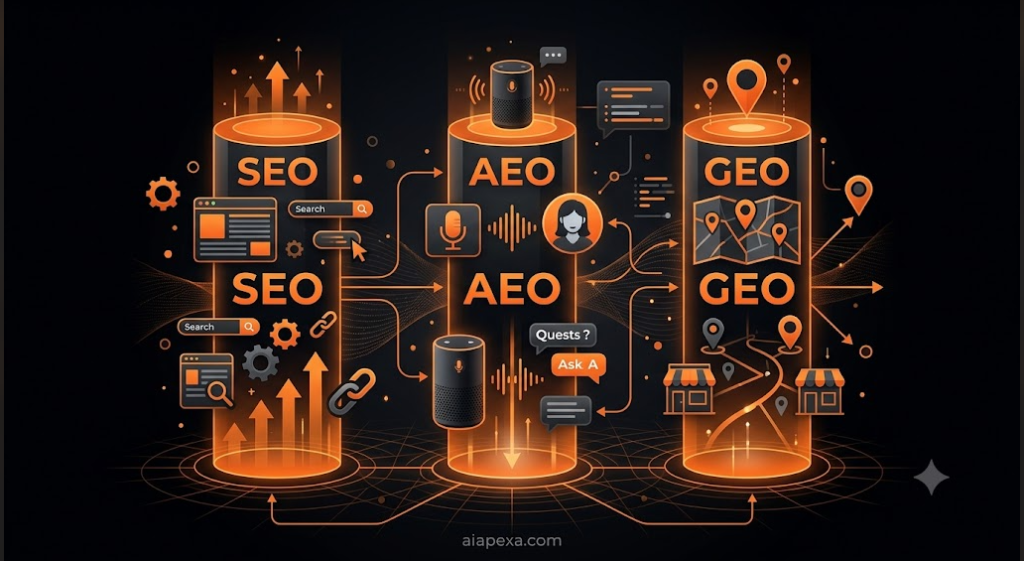
SEO vs AEO vs GEO: What Should Your Business Focus on in 2026 ? Alternative SEO Titles SEO vs AEO vs GEO: What Should Your Business Focus on in 2026? SEO, AEO or GEO — What Actually Matters in 2026? SEO vs AEO vs GEO Explained for Business Owners in 2026 AEO vs GEO vs SEO: A Practical 2026 Business Guide SEO vs AEO vs GEO: Where to Focus Your Marketing Budget in 2026 Best Title (selected): SEO vs AEO vs GEO: What Should Your Business Focus on in 2026? Meta Description Option 1: SEO vs AEO vs GEO — confused about the difference? Here’s a clear, practical breakdown of what to prioritize for your business in 2026. Option 2: Understand SEO, AEO and GEO in plain English, and get a clear 2026 recommendation on where your business should focus first. Option 3: SEO, AEO and GEO aren’t separate strategies. Here’s how they work together, and what small businesses should prioritize in 2026. Best Meta Description (selected): SEO vs AEO vs GEO — confused about the difference? Here’s a clear, practical breakdown of what to prioritize for your business in 2026. URL Slug /seo-vs-aeo-vs-geo/ Primary Keyword SEO vs AEO vs GEO Secondary / Related Keywords SEO vs AEO, AEO vs GEO, SEO vs GEO, what is SEO, what is AEO, what is GEO, SEO AEO GEO, AEO meaning, GEO meaning in digital marketing, generative engine optimization, answer engine optimization, AI search optimization, AI search visibility, Google AI search, AI Overviews, organic search, search engine optimization, search visibility, AI-generated answers, zero-click searches, conversational search, semantic search, search intent, content optimization, entity optimization, digital marketing strategy 2026 Complete Blog SEO vs AEO vs GEO: What Should Your Business Focus on in 2026? A few years ago, “getting found on Google” meant one thing: ranking your website on the first page of search results. That’s still true, but it’s no longer the whole picture. Today, people also get answers directly inside search results without clicking anything, and a growing number ask questions straight to tools like ChatGPT, Gemini, or Google’s AI Overviews instead of typing a keyword into a search bar at all. That shift has given rise to three terms that get thrown around a lot right now: SEO, AEO, and GEO. If you’ve seen these acronyms and felt unsure what actually separates them, you’re not alone — a lot of the content explaining them online is either oversimplified or unnecessarily complicated. Here’s the short version, which we’ll unpack properly through the rest of this article: SEO helps your website get found in traditional search results. AEO focuses on getting your content used as a direct answer to a question. GEO is about making sure AI systems understand your content well enough to reference, cite, or mention it when generating a response. They’re not three competing strategies you have to choose between. They’re three related layers of the same goal — being visible wherever your customers are actually looking. SEO vs AEO vs GEO at a Glance Factor SEO AEO GEO Main goal Rank well in traditional search results Provide the direct answer to a specific question Be understood, cited, or referenced by generative AI systems Primary focus Keywords, technical health, backlinks, content quality Clear, concise, well-structured answers Entity clarity, factual accuracy, topical authority Content approach Comprehensive, intent-matched pages Direct answers, FAQs, definitions Self-contained, fact-dense, easy-to-extract passages Search experience Blue-link results pages Featured snippets, voice answers, quick-answer boxes AI Overviews, chatbot responses, conversational search Main opportunity Long-term organic traffic and authority Featured placement and quick-answer visibility Brand mentions and citations inside AI-generated answers Best suited for Every business with a website Businesses answering common customer questions Businesses wanting visibility in AI-driven discovery What is SEO ? Search Engine Optimization is the practice of making your website easier for search engines like Google to find, understand, and rank for relevant searches. It’s the foundation that AEO and GEO are both built on top of, so it’s worth being clear on what it actually involves. At a high level, SEO covers a few connected areas: Keyword research — understanding the actual words and phrases your customers search for Search intent — making sure a page matches what someone is actually trying to accomplish, not just the words they typed On-page SEO — title tags, headings, URLs, and content structure that help search engines understand a page Technical SEO — making sure your site can be properly crawled, indexed, and loaded quickly Internal linking — connecting related pages so both users and search engines can navigate your site logically Backlinks — other relevant, trustworthy sites linking to yours, which signals authority Helpful content — pages that genuinely answer what a reader needs, not thin content built around a keyword User experience — clear navigation, readable layouts, and a site that’s pleasant to use Local SEO — for businesses serving specific areas, optimizing for location-based searches SEO isn’t going away in 2026, and it’s not being replaced by AI search. If anything, it matters more, because AI-driven search features are largely built on top of the same underlying systems that power traditional search. Google has been explicit about this in its own developer documentation: the best practices for SEO remain relevant because its generative AI features on Search are rooted in the same core Search ranking and quality systems used for regular results. Google’s Search Central documentation also states there’s nothing fundamentally different creators need to do to be considered for AI features beyond following its standard Search Essentials guidance. What is AEO ? Answer Engine Optimization is the practice of structuring content so it can be pulled out and used as a direct answer — whether that’s a featured snippet, a voice assistant response, or a short answer generated inside a search results page. The core idea behind AEO is that people increasingly ask full questions rather than typing fragmented keywords. Someone searching “how long does SEO take to show results” wants a direct,

🚀 SEO & AI Search

How to Improve Your Google Ranking Without Spending More on Ads ?

( Alternative SEO Titles ) 1. How to Improve Your Google Ranking Without Spending More on Ad2. Rank Higher on Google Without Increasing Your Ad Budget3. Improve Organic Google Rankings Without Paying for More Ads4. Boost Your Website Visibility Without Spending More on Google Ads5. How Small Businesses Can Rank Higher on Google Without a Bigger Ad . Budget Best Title (selected): How to Improve Your Google Ranking Without Spending More on Ads Meta Description Option 1: Want to improve your Google ranking without spending more on ads? Here’s a practical, no-fluff guide to building organic visibility that lasts. Option 2: Learn how to improve your Google ranking without increasing your ad budget. Practical SEO steps for small and growing businesses. Option 3: You don’t need a bigger ad budget to rank higher. Here’s how to improve your Google ranking through SEO, content, and technical fixes. Best Meta Description (selected): Want to improve your Google ranking without spending more on ads? Here’s a practical, no-fluff guide to building organic visibility that lasts. URL Slug /improve-google-ranking-without-ads/ Primary Keyword improve Google ranking without spending more on ads Secondary / Related Keywords improve Google rankings, rank higher on Google, organic Google ranking, improve website visibility, SEO without increasing ad budget, organic traffic, Google SEO, on-page SEO, technical SEO, local SEO, keyword research, quality content, website speed, mobile-friendly website, backlinks, internal linking, search intent, user experience, Google Business Profile, content optimization, website authority How to Improve Your Google Ranking Without Spending More on Ads If your Google Ads budget keeps climbing every quarter just to maintain the same amount of traffic, you’re not imagining things. Cost-per-click has been rising across most industries for years, and at some point, a lot of business owners ask the same question: is there a way to get found on Google without pouring more money into ads? The short answer is yes. Organic SEO won’t replace paid ads overnight, and it doesn’t work on the same timeline. But it builds visibility that keeps working after you stop paying for it, which is something a Google Ads campaign can’t do. If your website has never had real SEO attention, there’s a good chance you’re leaving traffic on the table that has nothing to do with your ad spend at all. This guide walks through what actually moves the needle on organic rankings, why your site might be underperforming right now, and what you can realistically do about it — without touching your ads budget. Can You Improve Google Rankings Without Spending More on Ads?   Paid search and organic search are two completely different systems, even though they show up on the same results page.  Google Ads works on an auction. You bid on keywords, you pay per click, and  your visibility disappears the moment you stop paying. It’s fast, but it’s rented  space. Organic rankings work differently. Google ranks pages based on relevance, quality, authority, and how well a page satisfies what someone actually searched for. There’s no bid involved. A well-optimized page that genuinely answers a search query can rank for months or years without any ongoing ad spend. That doesn’t mean organic SEO is free in the sense of requiring no investment — it takes time, content work, and technical attention. But it’s a different kind of investment. Instead of paying for every visitor, you’re building an asset that keeps attracting visitors on its own. One more thing worth clearing up: running Google Ads does not directly improve your organic rankings. Google has been clear about this for years — ad spend and organic search results are handled by separate systems. So if your organic rankings are weak, spending more on ads won’t fix that. It just means you’re paying for visibility your website isn’t earning on its own. Can You Improve Google Rankings Without Spending More on Ads? Before jumping into fixes, it helps to understand why a site underperforms in the first place. Usually it’s a combination of a few of these: Poor search intent matching — the page exists, but it doesn’t actually answer what the searcher is looking for. Weak or thin content — pages with a few generic paragraphs that don’t go deep enough to be useful. Technical SEO problems — pages that search engines can’t properly crawl or index. Slow website — visitors and search engines both lose patience with pages that take too long to load. Poor mobile experience — most searches now happen on phones, and a clunky mobile site hurts rankings and conversions alike. Weak internal linking — important pages are buried with no clear path leading to them. Lack of authority — few or no relevant sites linking back, which makes it harder to compete for popular keywords. Poor local optimization — for businesses serving a specific area, an incomplete or inconsistent local presence holds rankings back. Weak keyword targeting — pages built around vague terms instead of the specific phrases customers actually type in.   Most websites aren’t dealing with just one of these. It’s usually a mix, which is actually good news — it means there are several places to make improvements, not just one big fix to chase. 10 Practical Ways to Improve Your Google Ranking Without Increasing Your Ad Budget 1. Understand What Your Customers Are Searching For Good SEO starts with knowing what your audience actually types into Google, not what you assume they type. This is keyword research, but it’s really just customer research with a search bar attached. Look at the language customers use in emails, reviews, and sales conversations. Check what questions come up repeatedly. Tools like Google Search Console can show you which search terms are already bringing people to your site — including ones you might not have targeted on purpose. Matching your content to real search intent, rather than industry jargon, is one of the highest-leverage things you can do. 2. Improve Existing Content New content isn’t always the answer. Often, your best opportunity is sitting in

Scroll to Top