
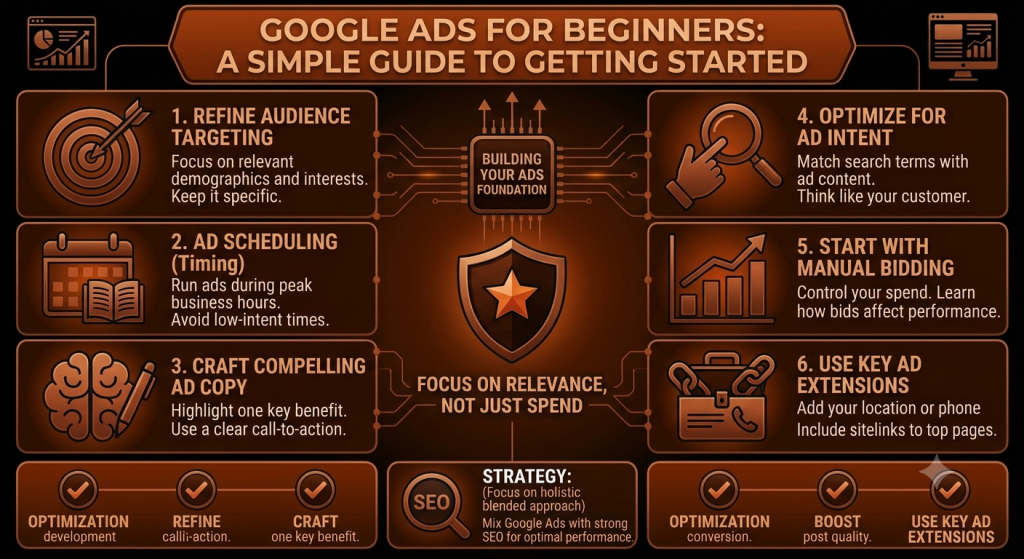
Google Ads for Beginners: A Simple Guide to Getting Started
Open a Google Ads account for the first time and it can feel like stepping into a cockpit — campaign types, bidding strategies, match types, conversion goals, all asking for a decision before you’ve even written your first ad. It’s no surprise a lot of beginners either freeze or just click through the defaults and hope for the best.
The good news is that the core idea behind Google Ads is actually simple, even if the interface isn’t. This guide walks through it step by step — what Google Ads is, how it works, and how to set up a first campaign without getting lost in features you don’t need yet.
Quick Answer: Google Ads is Google’s advertising platform that lets businesses promote products and services across eligible Google properties and partner placements. Businesses choose a goal, target relevant keywords or audiences, set a budget, and generally pay when someone interacts with their ad — with exact targeting options and formats depending on the campaign type chosen.
What Is Google Ads?
Google Ads is paid advertising — businesses pay to appear in front of people, rather than earning that visibility for free the way organic search results do. Ads can appear on Google’s search results, and depending on the campaign type, across other Google properties and partner placements as well.
The core difference is simple: organic search visibility is earned through SEO and isn’t paid for directly, while paid search visibility is bought, typically with advertisers paying when someone interacts with their ad in a qualifying way. A bakery might show up organically for “best sourdough recipe” after months of content work, while a Google Ads campaign for “bakery near me” could start showing an ad the same day it’s launched.
How Does Google Ads Work?
At a basic level, the process looks like this: a business creates a campaign, chooses a goal, selects relevant targeting, creates ads, and sets a budget and bidding approach. When someone’s search or browsing matches an opportunity, Google evaluates eligible ads and may show one to that person. If they click or take another desired action, the business measures the result and adjusts the campaign accordingly.
Behind this sits something often called the ad auction — but it’s not simply a matter of the highest bidder automatically winning every time. Relevance, ad quality, your bid, and the context of the search all play a role in which ads actually get shown and how they perform.
Why Do Businesses Use Google Ads?
Google Ads lets businesses reach people who are actively searching, often faster than waiting for organic rankings to build. It offers real control over targeting specific audiences or locations, setting and adjusting a budget, and measuring exactly what’s happening with the campaign. It’s useful for generating leads, driving sales, promoting specific products or services, and quickly testing different offers and messaging.
It’s not automatically the right fit for every business, though — it tends to work best when there’s genuine search demand for what you offer and a website ready to convert the traffic it sends.
Google Ads vs SEO: What's the Difference?
| Factor | Google Ads | SEO |
|---|---|---|
| Traffic | Paid | Organic |
| Speed | Can provide visibility quickly | Usually takes longer |
| Cost model | Advertising spend | Investment in SEO work |
| Control | More direct control over campaigns | Less direct control over rankings |
| Long-term value | Depends on ongoing campaigns | Can build lasting organic visibility |
| Best for | Paid visibility, targeted campaigns | Long-term organic growth |
Both can be genuinely useful, and neither is automatically better for every business — many businesses end up using both for different reasons.
What You Need Before Starting Google Ads
Before opening an account, it helps to have a clear business goal, a defined target audience, a website or relevant destination page ready to receive traffic, a clear product or service to promote, a realistic budget, defined conversion goals, and at least a basic sense of what your customers are actually searching for.
Sending paid traffic to an unprepared website — slow, unclear, or missing a way to contact you — tends to waste budget regardless of how well the campaign itself is built.
Step 1: Create Your Google Ads Account
Setting up an account generally involves signing up with a Google account, providing basic business information, and working through Google’s setup flow. The exact interface and steps can change over time, so it’s worth checking Google’s current official setup guide rather than relying on older instructions.
Whatever the current flow looks like, take time to review the account settings carefully — location, language, and billing details in particular — before launching your first campaign.
Step 2: Choose the Right Campaign Goal
Google Ads asks you to pick a goal early on — common options include leads, sales, website traffic, and awareness or reach, with app-related goals available for relevant businesses.
The right goal depends on your business: a local service business often cares most about leads, an ecommerce store typically focuses on sales, and a newer brand might genuinely benefit from an awareness-focused goal depending on its specific objective. No single goal is universally correct — pick the one that actually matches what you’re trying to achieve.
Step 3: Choose a Google Ads Campaign Type
Common campaign types include Search, Display, Shopping, Video, App, and Performance Max, each generally designed for a different purpose — Search ads target people actively typing queries, Display ads show visual ads across a network of sites, Shopping ads showcase products, Video ads run on video platforms, and so on.
For beginners, Search campaigns are often easier to understand at first, since they’re built around capturing existing search demand from people already looking for something specific. That doesn’t mean Search is always the best choice — an ecommerce store might get more value from Shopping ads, for instance. Campaign types and their features can change, so check Google’s current documentation before deciding.
Step 4: Choose the Right Keywords
Keywords are the terms you’re telling Google your ads are relevant to. In Search campaigns, they’re central to whether your ad shows up at all. It helps to think about search intent — informational searches (“how to”) suggest someone researching, while commercial or transactional searches (“buy,” “near me,” “service”) suggest someone closer to a decision.
A business selling website development services might target relevant terms like “website development services,” “website developer near me,” or “business website development” — keywords that reflect what the business genuinely offers, not just terms with high search volume.
Keyword Match Types and Search Terms: A Beginner's Overview
Google Ads generally offers a few keyword match types — broad match, phrase match, and exact match — which control how closely a search has to match your keyword for your ad to be eligible. Broad match tends to allow the widest range of related searches, while exact match is the most restrictive.
It’s worth understanding the difference between your keywords and your search terms — the actual queries people typed that triggered your ad. These can differ meaningfully depending on match type, so reviewing your search terms report regularly is an important habit from the start. Exact match-type behavior can change over time, so check current Google Ads documentation if you want precise technical details.
What Are Negative Keywords?
Negative keywords are terms you tell Google NOT to show your ad for — a direct way to reduce irrelevant traffic and protect your budget.
A business offering premium website development services but not free ones might want to exclude searches involving “free” or “DIY,” depending on what shows up in their actual search terms. Negative keywords shouldn’t be chosen blindly from a generic list — they should reflect your specific business and what you’re actually seeing in your own account data.
Step 5: Write a Better Google Search Ad
A strong ad usually has a headline and description that genuinely match what the searcher is looking for, a clear benefit or offer, relevant keywords worked in naturally, and a specific call to action.
A simple fictional example: for the search “website developer near me,” an ad reading “Custom Business Websites — Get a Free Quote Today” is more directly relevant than a vague “We Build Great Websites.” No particular headline can guarantee a higher click-through rate — relevance and clarity simply tend to help.
Step 6: Send Visitors to the Right Landing Page
The path is: Ad → Landing Page → Conversion. A good ad can’t fully make up for a poor landing page — if visitors arrive somewhere confusing or unrelated to what the ad promised, they tend to leave without converting.
Aim for message match with the ad, a clear headline, a strong call to action, mobile-friendly design, fast loading, simple forms, visible trust signals, and easy navigation. This is one of the areas beginners most commonly overlook, and it’s often the single biggest lever for improving results.
Step 7: Set a Realistic Google Ads Budget
Your budget depends on your daily and monthly planning, expected CPC (cost per click — what you pay when someone clicks your ad), competition, search volume, industry, location, customer value, and conversion rate. There’s no single “correct” Google Ads budget that applies to every business.
As a purely illustrative example: a business wanting 10 leads a month, with an expected 5% conversion rate and an example CPC of $2, would estimate around 200 clicks needed, for roughly $400 in spend. These numbers are made up to illustrate the process — not a guaranteed industry average.
Step 8: Understand Google Ads Bidding
Bidding is essentially how you compete for eligible ad opportunities. Google Ads generally offers manual bidding where available, along with various automated bidding options, including approaches focused on generating conversions or clicks.
Beginners don’t need to master every bidding strategy immediately — no single strategy is always best, and the right one depends on your goals and how much conversion data you already have. Because bidding options can change over time, check Google’s current documentation before committing to a specific strategy name.
Step 9: Choose Your Target Audience and Location
Targeting settings generally include geographic location, language, and audience signals where applicable, along with matching to your customers’ actual intent and your realistic service area.
Local businesses in particular should pay close attention to location settings — default or overly broad targeting can mean paying for clicks from people well outside your service area. That said, not every business needs narrow targeting; it depends on how and where you actually operate.
Step 10: Set Up Conversion Tracking
Conversion tracking is one of the most important parts of Google Ads, and one beginners most often skip. Conversions could be phone calls, contact form submissions, purchases, bookings, sign-ups, or quote requests — whatever counts as a genuinely valuable action for your business.
It’s worth keeping this distinction clear: clicks tell you someone interacted with your ad, while conversions tell you whether that interaction actually led to something valuable. Without conversion tracking, you’re optimizing blind. Technical setup steps change over time, so follow Google’s current official guidance when implementing tracking.
Step 11: Review Everything Before Launching
Before hitting launch, run through a quick check: correct campaign goal, correct location, relevant keywords, negative keywords reviewed, relevant ads, correct landing page, budget checked, conversion tracking checked, contact information correct, and mobile experience checked.
A few minutes of careful review here can save a lot of wasted budget later — most beginner mistakes are caught at this stage, not after the campaign has already been spending for a week.

What Should Beginners Track in Google Ads?
Useful metrics include impressions, clicks, CTR (click-through rate), CPC, conversions, conversion rate, cost per conversion, cost per lead, your search terms, and revenue or ROAS where applicable.
Which of these matters most depends on your goal — a lead-generation business should care most about cost per lead and lead quality, not just clicks. Focusing only on clicks is one of the most common beginner traps, since clicks alone don’t tell you whether the campaign is actually helping the business.
How Long Should You Run Google Ads Before Making Changes?
Avoid making major decisions off a tiny amount of data — a handful of clicks rarely tells you anything reliable. Give the campaign enough time and volume to reveal real patterns, review performance regularly, base changes on actual results, and avoid changing everything at once so you can tell what actually caused any shift in performance.
There’s no single universal number of days that applies to every account — how quickly useful data accumulates depends on your traffic volume, budget, industry, and how long your typical customer takes to convert.
10 Common Google Ads Mistakes Beginners Should Avoid
- Starting without a clear goal — makes every later decision harder to evaluate.
- Choosing irrelevant keywords — targeting terms that don’t genuinely match your business.
- Ignoring negative keywords — letting obviously irrelevant searches drain the budget.
- Targeting too broadly without a reason — spreading a limited budget across an unfocused audience.
- Sending traffic to a weak landing page — wasting well-targeted clicks on a page that can’t convert them.
- Not tracking conversions — running a campaign with no way to measure real results.
- Focusing only on clicks — mistaking activity for actual business outcomes.
- Increasing budget before fixing campaign problems — scaling up inefficiency rather than fixing it.
- Making too many changes too quickly — losing the ability to tell what actually worked.
- Expecting guaranteed results — no campaign, however well built, guarantees traffic, leads, or sales.
How to Improve Your Google Ads Campaign Over Time
Optimization is an ongoing process, not a one-time setup task. Regularly review search terms, add relevant negative keywords as you spot them, improve ad relevance, test different messaging, strengthen landing pages, review location and device performance, check conversion quality (not just quantity), adjust budget based on real evidence, remove obvious waste, and keep the focus on profitable business outcomes rather than surface-level activity.
Simple Example: Google Ads for a Local Business
The following is a hypothetical example meant to illustrate the process — not a real result or client case study.
A local website development company wants more enquiries. It could define leads as its goal, identify relevant search intent (people actively looking to hire a developer, not just researching), select keywords that reflect its actual services, create Search ads matching that intent, send clicks to a relevant service page rather than the homepage, set a controlled starting budget, track genuine enquiries as conversions, review search terms regularly, and optimize based on what the data actually shows.
What Results Can a Beginner Expect From Google Ads?
Results vary significantly from business to business. Some campaigns generate leads or sales relatively quickly; others need meaningful optimization before they perform well. Traffic doesn’t guarantee conversions, and budget doesn’t guarantee profitability — outcomes depend on your offer, actual demand, competition, targeting quality, ad relevance, landing page, and whether conversion tracking is set up correctly.
There’s no honest way to promise a beginner a specific result before seeing how their particular business performs.
Is Google Ads Worth It for Beginners?
It tends to make sense when there’s clear search demand for what you offer, you have a genuinely useful offer, customers actively search for your kind of product or service, your website can actually convert visitors, you can afford some initial testing, and you’re able to set up conversion tracking.
It may not be the first priority for every beginner — a business with no clear offer yet, or one whose customers don’t typically search for what they sell, might get more value from working on those fundamentals first.
Google Ads Budget Tips for Beginners
- Start with a controlled, modest budget rather than going all in immediately
- Understand your likely CPC before deciding how much to scale
- Focus spend on genuinely relevant searches
- Track conversions that actually matter to your business
- Avoid wasting budget on obviously irrelevant traffic
- Optimize the campaign before blindly increasing spend
- Increase budget only once the campaign’s economics actually make sense
Should Beginners Use Google Ads and SEO Together?
Google Ads provides paid visibility you can turn on quickly; SEO builds organic visibility that compounds over time. Together, they can support a broader search marketing strategy — paid campaigns can provide useful, faster insight into which keywords and messaging actually convert, while SEO builds longer-term traffic that doesn’t depend on ongoing ad spend.
Beginners don’t need to choose one permanently. Many start with a small Google Ads test while building SEO fundamentals in parallel.
Frequently Asked Questions
What is Google Ads in simple words?
Google Ads is Google’s advertising platform that lets businesses pay to show ads to people searching for relevant terms or browsing eligible Google properties and partner sites.
How does Google Ads work for beginners?
You create a campaign, choose a goal, pick relevant keywords or targeting, write an ad, set a budget, and Google shows your ad when a relevant opportunity comes up. You then measure results and adjust from there.
How much does Google Ads cost?
Cost varies widely by industry, keyword competition, and location. There’s no fixed universal price — checking your likely CPC for your specific keywords gives a much more useful starting estimate.
How much should a beginner spend on Google Ads?
Many beginners start with a modest, controlled test budget — enough to gather meaningful data — and adjust from there based on real results rather than a generic recommended amount.
Is Google Ads good for small businesses?
It can be, especially when there’s clear search demand for what the business offers and the website is ready to convert visitors. It’s not automatically the right first step for every small business.
How do I choose keywords for Google Ads?
Start with terms that genuinely reflect what you offer and what your customers are likely searching for, paying attention to search intent — informational versus commercial — rather than just picking high-volume terms.
How long does it take to see results from Google Ads?
It varies by business and industry. Some visibility can appear almost immediately, but gathering enough data to judge real performance usually takes some weeks, depending on traffic volume.
Can I run Google Ads myself as a beginner?
Yes, many beginners manage their own campaigns, especially at a smaller scale. It takes some learning and regular attention, and hiring help becomes more worthwhile as campaigns grow more complex.
Conclusion: Getting Started With Google Ads
At its core, Google Ads comes down to a manageable process: pick a clear goal, choose relevant keywords and targeting, write ads that genuinely match search intent, send traffic to a landing page built to convert, set a realistic budget, and track conversions from day one so you actually know what’s working.
None of this needs to be perfect on the first attempt — Google Ads rewards steady optimization more than a flawless launch. Review your search terms, fix what’s obviously not working, and build from there. If you’re ready to start, setting up conversion tracking properly before you launch is usually the single most valuable thing a beginner can get right early.