
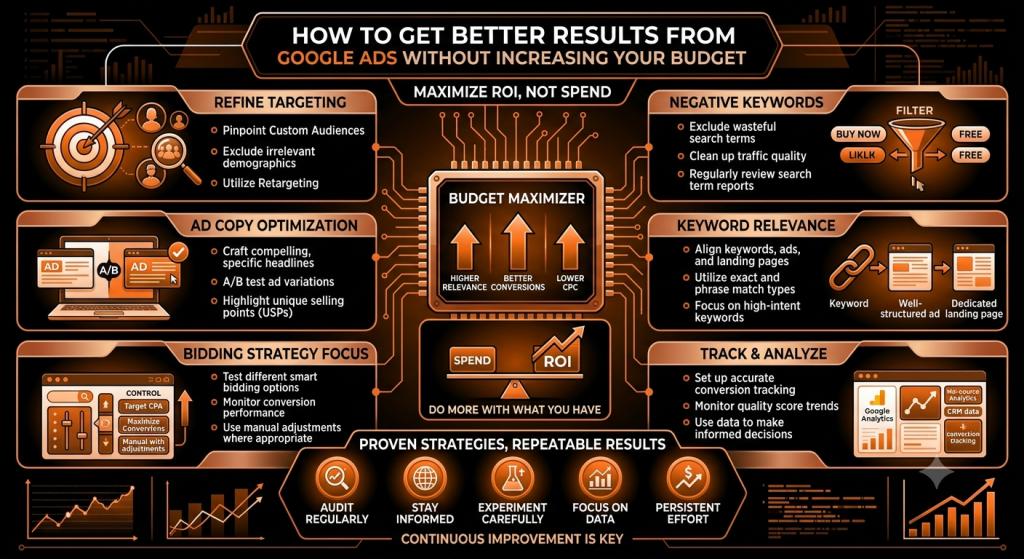
How to Get Better Results From Google Ads Without Increasing Your Budget
When Google Ads results start slipping, the first instinct for a lot of businesses is to raise the budget and hope more spend fixes it. Sometimes that just means paying for more of the same wasted clicks. If your targeting, ad copy, or landing page aren’t working, a bigger budget mostly amplifies the problem rather than solving it.
Before spending more, it’s worth checking whether you’re actually getting the most out of what you’re already spending. This article walks through ten practical ways to improve Google Ads performance using your existing budget — no dramatic overhaul required, just a closer look at where your money is actually going.
Quick Answer: You can often get better Google Ads results without increasing your budget by removing wasted clicks, improving keyword targeting, adding negative keywords, improving ad relevance, strengthening your landing pages, tracking conversions correctly, and shifting budget toward the campaigns and search terms that are already performing well.
Better Google Ads Results Start With Better Optimization
More budget and better use of your existing budget are two different problems. If a business is spending money on clicks that were never going to convert, increasing the budget doesn’t fix anything — it just increases the amount of wasted spend.
A simple example: if 30% of your ad spend is going toward searches that have nothing to do with what you actually sell, doubling your budget doesn’t improve your results proportionally. It’s usually more effective to fix that leak first, then think about whether more budget makes sense.
1. Check Your Search Terms Regularly
Search terms are the actual phrases people typed before your ad showed up — and they can differ quite a bit from the keywords you’re targeting, especially with broader match types. Reviewing this report regularly shows you exactly where your budget is going.
A landscaping business targeting “lgarden design” might discover it’s also showing up for “garden design games” or “free garden design software” — clicks that were never going to become customers. Spotting patterns like this is one of the fastest ways to find wasted spend and real keyword opportunities you hadn’t considered.
2. Add Negative Keywords to Stop Wasted Clicks
Negative keywords tell Google which searches you don’t want your ad to appear for. They’re one of the most direct ways to protect a limited budget from irrelevant clicks.
A business selling premium leather bags might add “cheap,” “free,” or “DIY” as negative keywords, since those searchers are unlikely to be looking for what they’re offering. The right negative keywords depend entirely on your actual business and what you’ve seen show up in your search terms report — there’s no universal list that works for everyone.
3. Focus Your Budget on High-Intent Keywords
Not every click carries the same value. Informational searches (“what is”, “how does”) usually indicate someone still researching, while commercial or buyer-focused searches (“book,” “hire,” “near me,” “price”) tend to signal someone closer to making a decision.
A moving company might get plenty of clicks from “how to pack for a move” but far more conversions from “movers near me” or “moving company quote.” Choosing keywords based on what actually matches your business goals — not just search volume — tends to make a real difference in efficiency.
4. Write Ads That Match What People Are Searching For
Ad relevance affects who actually clicks through. An ad that closely matches the search someone just typed tends to attract more qualified clicks than a generic, one-size-fits-all ad.
For “emergency plumber [city],” an ad that says “24/7 Emergency Plumber — [City] — Call Now” is more directly relevant than a vague “Quality Plumbing Services.” Clear benefits, a specific offer, a strong call to action, and language that directly addresses the searcher’s problem all help — though no specific wording can guarantee a higher click-through rate on its own.
5. Improve Your Landing Page Before Spending More
The path is simple: Ad → Landing Page → Conversion. If the landing page is slow, confusing, or doesn’t match what the ad promised, even perfectly targeted clicks won’t convert — and that’s wasted spend regardless of how well the ad itself performed.
Focus on message match (the page should clearly continue what the ad said), a clear headline, a strong offer, easy navigation, a mobile-friendly layout, fast loading, an obvious call to action, visible trust signals, and a simple form that doesn’t ask for more than necessary. Fixing a weak landing page is often more impactful than any bidding adjustment.
6. Make Sure You Are Tracking the Right Conversions
Conversion tracking tells Google’s systems and you what actually counts as a win — a lead, a call, a form submission, a purchase, a booking, or another meaningful business action. If you’re tracking the wrong thing, or nothing at all, both your reporting and Google’s automated bidding can end up optimizing toward the wrong outcome.
A business tracking “page views” instead of “form submissions,” for example, might think a campaign is doing well when it’s actually generating very few real enquiries. Getting this right is foundational — every other optimization depends on accurate data.
7. Put More Attention on What Is Already Working
Optimization isn’t only about cutting things that spend money — it’s also about noticing what is already generating good outcomes and giving it more attention. Review performance across campaigns, ad groups, keywords, search terms, locations, devices, audiences, individual ads, and landing pages.
If one search term or ad group is quietly producing most of your genuine leads, that’s worth understanding and potentially building on — rather than treating your account as one uniform block that all needs the same adjustments.
8. Avoid Paying for Clicks From the Wrong Locations
Location targeting matters a lot for local, service-area, and regional businesses. It’s worth checking whether your ads are actually reaching people in places you serve — broad or default targeting settings can sometimes show ads well outside your realistic service area.
A home-service business that only serves a 20-mile radius but has location settings covering an entire state may be paying for clicks from people it can never actually serve. Not every business needs narrow geographic targeting, but every business benefits from checking that its settings actually match how it operates.
9. Look at Mobile, Desktop, and Other Device Performance
People often behave differently depending on the device they’re using, and conversion performance can vary accordingly — clicks alone don’t tell the full story. It’s worth checking whether one device type is generating clicks without producing proportional conversions.
This isn’t about assuming mobile or desktop is inherently better — it depends entirely on your actual account data. If mobile traffic underperforms, it’s also worth checking whether your landing page genuinely works well on a phone, since that often explains the gap.
10. Test One Thing at a Time
Testing headlines, offers, calls to action, landing pages, keyword themes, or campaign structures can meaningfully improve performance over time — but only if you can actually tell what caused the change. Changing several things simultaneously makes it nearly impossible to know which adjustment actually helped or hurt.
Keeping tests simple and sequential takes more patience, but it gives you real, usable insight instead of a guess about what worked.
How to Use the Same Google Ads Budget More Effectively
Once you know which campaigns, keywords, and search terms are actually producing valuable outcomes, you can start shifting budget deliberately — toward strong performers, high-intent searches, and campaigns tied to genuine conversion data, and away from weaker performers that mostly generate clicks without results.
The goal isn’t finding the cheapest possible clicks. It’s generating outcomes that are actually valuable to your business — factoring in customer value and profitability, not just cost per click.
Don't Focus Only on Clicks
Impressions, clicks, and CTR (click-through rate) tell you about visibility and initial interest. Conversions, conversion rate, cost per conversion, leads, sales, and revenue tell you what actually happened to your business as a result.
A hundred cheap clicks that generate almost no real leads can be worth far less than twenty more expensive, better-targeted clicks that turn into several genuine enquiries. Judging a campaign by clicks alone can lead you toward decisions that look good on the surface but don’t actually help the business.
Common Google Ads Mistakes That Waste Your Budget
- Targeting overly broad searches — attracting clicks with little real relevance to your business.
- Ignoring search terms — missing where your budget is actually being spent.
- Not using relevant negative keywords — letting obviously irrelevant searches keep triggering your ads.
- Sending traffic to irrelevant landing pages — undermining otherwise solid targeting.
- Tracking the wrong conversions — optimizing toward outcomes that don’t actually matter to the business.
- Focusing only on clicks — missing whether those clicks turn into real outcomes.
- Running too many campaigns without enough data — spreading budget too thin to learn anything useful from any of them.
- Ignoring location performance — paying for clicks outside your realistic service area.
- Ignoring device performance — missing a clear gap between mobile and desktop results.
- Making too many changes at once — losing the ability to tell what actually worked.
- Not reviewing campaign performance regularly — letting inefficiencies continue unnoticed.
How Often Should You Optimize Your Google Ads Campaign?
Some checks — like reviewing search terms or unusual spend spikes — can reasonably be done on a regular, even weekly basis. Larger strategic changes, like shifting significant budget or restructuring campaigns, should generally wait until you have enough data to draw a reliable conclusion.
The right review frequency really depends on your campaign size, traffic volume, budget, and business goals — a high-traffic account can support faster decisions than a small, low-volume one. Making major changes based on a handful of clicks usually leads to chasing noise rather than real signal.
Example: Getting More Leads Without Increasing the Budget
The following is a hypothetical example meant to illustrate the process — not a real client case study, and no specific numerical results are implied.
A local service business with a fixed Google Ads budget could, instead of raising that budget, work through a sequence like this: review search terms to spot irrelevant traffic, remove it with negative keywords, improve ad copy so it better matches high-intent searches, strengthen the landing page’s message match and call to action, confirm that genuine leads (not just page views) are being tracked correctly, and then shift more attention toward the search terms and campaigns already producing real enquiries.
None of these steps require additional spend — they’re about directing the existing budget more precisely toward what’s actually working.
How SEO and Google Ads Can Support Each Other
SEO builds organic visibility over time, while Google Ads provides paid visibility you can control directly. The two can support each other in practical ways: search term data from your ad campaigns can reveal genuine keyword opportunities worth targeting organically, and landing page improvements made for paid campaigns — clearer messaging, better mobile experience — tend to benefit organic visitors too.
Which channel deserves more focus still depends on your specific goals, budget, and timeline — but treating them as connected rather than entirely separate tends to produce better decisions in both.
Frequently Asked Questions
- How can I improve Google Ads results without increasing my budget?
Focus on efficiency: review search terms, add negative keywords, target higher-intent keywords, improve ad relevance, strengthen your landing page, and track conversions accurately so budget flows toward what’s actually working. - How can I reduce wasted Google Ads spend?
Regularly check your search terms report for irrelevant queries, add negative keywords to block them, and review location and device performance to catch spend going toward clicks that were unlikely to convert. - Do negative keywords improve Google Ads performance?
Yes, when chosen based on your actual search terms data. They stop your ads from showing for irrelevant searches, which helps protect your budget for more relevant, higher-intent clicks. - How can I get more leads from the same Google Ads budget?
Shift budget toward high-intent keywords and already-performing campaigns, improve your landing page’s message match and call to action, and make sure you’re tracking genuine leads rather than less meaningful actions. - Why are my Google Ads getting clicks but no conversions?
This usually points to a mismatch somewhere in the chain — low-intent keywords, ad copy that doesn’t match the landing page, a weak or confusing landing page, or conversion tracking that isn’t set up correctly. - How can I improve my Google Ads conversion rate?
Start with message match between your ad and landing page, a clear and specific offer, an obvious call to action, fast mobile loading, and accurate conversion tracking so you can see what’s actually happening. - How often should I optimize Google Ads?
Regular checks like search term reviews can happen weekly, but larger strategic changes should wait until you have enough data to draw a reliable conclusion — the right pace depends on your traffic volume and budget. - Is increasing the Google Ads budget always the best way to get more results?
No. If there’s inefficiency in targeting, ad relevance, or the landing page, increasing the budget often just increases wasted spend. Fixing those issues first usually produces better results than spending more.
Conclusion: Get More From Your Existing Google Ads Budget
Better Google Ads results don’t always require a bigger budget. Reviewing search terms, adding negative keywords, focusing on high-intent keywords, writing more relevant ad copy, strengthening landing pages, tracking the right conversions, and paying closer attention to what’s already working can meaningfully improve efficiency using the budget you already have.
None of this guarantees a specific improvement — results depend on your industry, competition, offer, and how consistently you apply these changes. What’s realistic is a steadier, more efficient use of your existing spend. Take a look at your account’s search terms report this week; it’s usually the fastest place to spot where your budget is actually going.